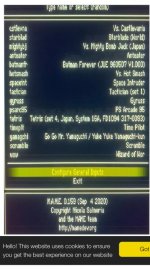
I’m trying to sort out a xp mame

Retroman839

Senior Member
vacBacker
Feedback
12 (100%)
Credits
7,257CR
I have nice mame 32 for xp

But it dose not have the options
To configure mame ?

When it has loaded into the gui
I have game selection via keyboard search type_
And I have only

Configure controls
Exit

No other options such as
To configure mame ,
Set rom paths etc …

Can I correct this ?
As I know I have my bios in with the roms folders …
But games won’t run and I’m suspecting it’s because bios :path is not configured.


Also in game Tab menu Options.
Won’t let me go up or down ?

.ini Is
ui_keyboard up Keyboards_up


ui_keyboard down keyboard_down

Can I fix with command prompt or can I update ?
I want to keep all my folders
As I have all flyers / bezels etc

Any help appreciated
 

ZedEx48K

8-Bit
Feedback
2 (100%)
Credits
1,366CR
Why XP, and are you going to be using a frontend? If so just get the UI version, set up in that and then still run it via command line, but the controls you would set up in the game, not the menu you are looking at. Open a game, press tab, everything is there, common or per game.
 

Retroman839

Senior Member
vacBacker
Feedback
12 (100%)
Credits
7,257CR
Xp…
Just because it’s a small xp pc I have it’s all set up ..

All I need to do is point mame to the roms folder for bios path.

The mame configuration options is not pressent
 

Retroman839

Senior Member
vacBacker
Feedback
12 (100%)
Credits
7,257CR
Just to say I have groovymame
Mister ,
Etc..

I just like this xp mame and small pc I have it on ..
I’m keeping it vga 31khz rather than 15khz like groovy.

I just don’t have the mame configuration option!
I’m trying to find out how I modify the .ini or .cfg
Só as that it would then be avalible to me to add bios / rom path ?
Cheers 😁
 
Last edited:

cools

I joined ages ago honest
Feedback
18 (95%)
Credits
716CR
The ini should be in the same folder as the exe. If it's not, whoever has configured it might have done something funky with startup. Does MAME run automatically on boot?
 

Bods

Senior Member
vacBacker
Feedback
3 (100%)
Credits
4,627CR
All Bios are in the Roms folder, think it was different on early versions

so like STVbios.zip is in Roms

In mame 0229 it has Configure Options, configure directories, roms which is only folder but has add folder
 
Last edited:

Retroman839

Senior Member
vacBacker
Feedback
12 (100%)
Credits
7,257CR
The ini should be in the same folder as the exe. If it's not, whoever has configured it might have done something funky with startup. Does MAME run automatically on boot?
Nope I have maximum front end
But need to configure mame before setting to boot right into on power up
 

Retroman839

Senior Member
vacBacker
Feedback
12 (100%)
Credits
7,257CR
Get the latest mame, get the latest roms, pleasuredome has the roms, most games don't require much extra grunt, a Pentium4 plays most stuff.

Thanks but can’t be arsed to download another rom set..

Thats just why I want to resolve with what this is ..

I have other pc with mame ..

Just liked the idea of this old set being usable …

I will preserver with trying stuff
Like -cc config mame etc
 
Top