
You are using an out of date browser. It may not display this or other websites correctly.
You should upgrade or use an alternative browser.
You should upgrade or use an alternative browser.
Batocera
- Thread starter penrhos
- Start date


I use it because it is extremely simple to set up - very much an emulation station alternative but I find it doesn't seem as easy to go so deep into setting the emulators up so if you have issues with something it can be very difficult to fix.
Im currently messing with my emulation PC and may go back to launchbox I think.
Im currently messing with my emulation PC and may go back to launchbox I think.

Exactly this.I use it because it is extremely simple to set up - very much an emulation station alternative but I find it doesn't seem as easy to go so deep into setting the emulators up so if you have issues with something it can be very difficult to fix.
Im currently messing with my emulation PC and may go back to launchbox I think.
it’s a really good F.E but it’s locked down a lot. I’ve just took it off yesterday my Ras pi and gone back to Retropie.
If you’re a tinkerer I’d stay away.

Found a torrent with a 1Tb pre-configured batocera build on it - currently downloading it 85% as of Friday teatime - I've got an Intel i5 NUC and a 1.92Tb SSD I got free from work that I'll give it a try on. Have a few PS3 and XB360 controllers lying around (which seem to be the default ones used).
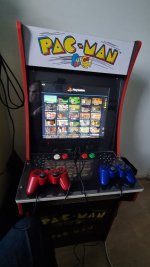
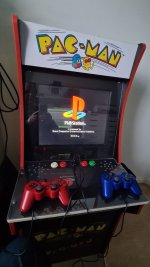
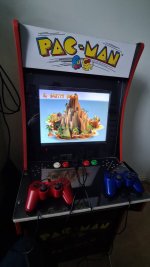
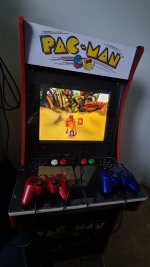
Also picked up a broken Arcade 1Up cheap so might end up converting it for this.
Also picked up a broken Arcade 1Up cheap so might end up converting it for this.
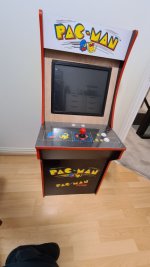
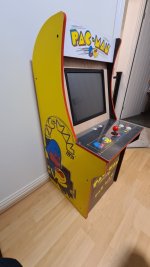
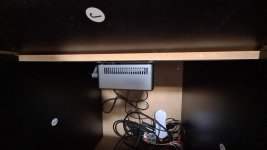
This is still very much a wip.
Cut some 12mm ply and made a horizontal monitor mount.
Fitted a 17" touchscreen industrial monitor I had lying around (It's got VGA, DP & HDMI ports + controls are on a panel connected by a 1.5M network cable).
Mounted an Intel I5 nuc under the control panel with a 1.92Tb ssd and 1Tb batocera image from arcadepunks.
I've got to get power, speakers and controls sorted + tweaking the pc config so it can startup & shutdown without the power button being accessible.
Cosmetics wise, painting bezel and replacement panel black and adding lexan covers, rest of cab was in pretty good shape considering what I paid for it.
So far so good batocera boots and runs OK, dunno if sound works as no speakers connected.
I might cheat with the controls and just have 2 x USB ports so I can plug a PS-Dualshock controller in rather than pissing around drilling 10+ holes to mount some Happ buttons and Suzo 500 stick (for a 1L6B panel).
Grandkids already love it and are hassling me to get it working so they can play Bomberman and Boulderdash.
Cut some 12mm ply and made a horizontal monitor mount.
Fitted a 17" touchscreen industrial monitor I had lying around (It's got VGA, DP & HDMI ports + controls are on a panel connected by a 1.5M network cable).
Mounted an Intel I5 nuc under the control panel with a 1.92Tb ssd and 1Tb batocera image from arcadepunks.
I've got to get power, speakers and controls sorted + tweaking the pc config so it can startup & shutdown without the power button being accessible.
Cosmetics wise, painting bezel and replacement panel black and adding lexan covers, rest of cab was in pretty good shape considering what I paid for it.
So far so good batocera boots and runs OK, dunno if sound works as no speakers connected.
I might cheat with the controls and just have 2 x USB ports so I can plug a PS-Dualshock controller in rather than pissing around drilling 10+ holes to mount some Happ buttons and Suzo 500 stick (for a 1L6B panel).
Grandkids already love it and are hassling me to get it working so they can play Bomberman and Boulderdash.
Last edited:
Nice. I use a original 360 wireless controller board out a 360 xbox to hook up my wireless 360 controllers. I cant have wired controllers as my Pc is behind the TV.
Arcade punks has a bit of a bad name I tend to get my builds of B*****.me
Enjoy.
Arcade punks has a bit of a bad name I tend to get my builds of B*****.me
Enjoy.

thesharkfactor
Active member
I'm trying to install a 256gb Batocera build for PiBoy DMG (Raspberry Pi4).
I formatted a new 256gb Samsung EVO SD card with SD Card Formatter and wrote the file with Win32 Disk Imager.
The device boots up, Batocera and all the emulator systems are there but there is no content showing up (no games). The file is 256gb so where is all the stuff?
I formatted the card again and now trying to install it again and we'll see what happens.
I formatted a new 256gb Samsung EVO SD card with SD Card Formatter and wrote the file with Win32 Disk Imager.
The device boots up, Batocera and all the emulator systems are there but there is no content showing up (no games). The file is 256gb so where is all the stuff?
I formatted the card again and now trying to install it again and we'll see what happens.
They should all be in the roms folder.I'm trying to install a 256gb Batocera build for PiBoy DMG (Raspberry Pi4).
I formatted a new 256gb Samsung EVO SD card with SD Card Formatter and wrote the file with Win32 Disk Imager.
The device boots up, Batocera and all the emulator systems are there but there is no content showing up (no games). The file is 256gb so where is all the stuff?
I formatted the card again and now trying to install it again and we'll see what happens.
I would get your pi 4 onto your network then log into the pi via \\BATOCERA
From memory you will see 4 folders you can access, one of those is roms.
If they are there then there’s something wrong with a config file somewhere.
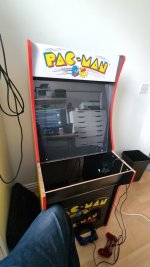
As for Batocera - it works OK on an I5 NUC but as expected it's pretty shit for anything taxing - like the WII. Initial thoughts are most of the images floating around seem to concentrate on "the more systems/romz the better" rather than curated sets so you spend forever cycling around lists of systems/games to find the one game you're looking for isn't there. The Menu system is nice though and I settled for the ribbon system one with a 5 x 5 grid for the games.....
It'd be nice if there was a minimum spec for "X" article in the Wiki but there isn't - but I suspect I'll be swapping the NUC for my old Dell 5040 + GT 1030 just to get a bit more grunt.
Controls wise I ended up plumping for a pair of PS3 dual-shock controllers connected up with USB cables (as I can't get them detected as Bluetooth ones). with the PS-button + Start being the "Exit" Hotkey.
Once I've completed the control panel I'll look at pulling some imaged out of my MESS & Emulators folder on the NAS to pad out what I'm looking for.
I've already tried one of those cheap usb controllers and arcade buttons which worked but just felt totally wrong even when playing MAME via Batocera - so I've scrapped that panel and gone back to the Dual-shocks.
It'd be nice if there was a minimum spec for "X" article in the Wiki but there isn't - but I suspect I'll be swapping the NUC for my old Dell 5040 + GT 1030 just to get a bit more grunt.
Controls wise I ended up plumping for a pair of PS3 dual-shock controllers connected up with USB cables (as I can't get them detected as Bluetooth ones). with the PS-button + Start being the "Exit" Hotkey.
Once I've completed the control panel I'll look at pulling some imaged out of my MESS & Emulators folder on the NAS to pad out what I'm looking for.
I've already tried one of those cheap usb controllers and arcade buttons which worked but just felt totally wrong even when playing MAME via Batocera - so I've scrapped that panel and gone back to the Dual-shocks.
Last edited:

That’s good to know, have you tried it?Just upgraded to V38 - now has built in wheel support, time to try it on the SR3 cab!