Problem Hantarex MTC9000 Vertical sync issue

myPinballs

Active member
Feedback
16 (100%)
Credits
693CR
Rebuilt a Hantarex MTC9000 that was non working. Got a lovely sharp colourful picture now but i cannot get the vertical hold to stabilise. Its like there is no middle ground for it to lock in it either scrolls up or down when you adjust the pot..

Doing my head in, even changed the TDA1670a vertical control chip, no difference

Also checked the vertical hold pot is ok on the little remote board to.

I did add the extra jumper for both syncs already to as that was the only way to solve the horizontal sync problem i had to

Firkin annoying monitors!! ha

Anyone got any ideas please :)
 

myPinballs

Active member
Feedback
16 (100%)
Credits
693CR
Still cannot solve with vertical scrolling issue. Tried absolutely everything including changing the horzontal output chip TDA 2595 as thats feeds the vertical sync for single wire comp sync setups, No different

You can adjust the vertical hold pot to move the image scrolling up or down but there is no middle area where it is stable.

what else can it be????
 

Bods

Senior Member
vacBacker
Feedback
4 (100%)
Credits
4,736CR
How many boards have you tried it on? or what are you connecting it too?

Last time I had same issue with one in Afterburner turned out it wasn't the monitor, was bad connection to it on the pcb filter board

Take it the Sync polarity switch is correct position or maybe not working (dirty)

All I can think of if it's been recapped
 

myPinballs

Active member
Feedback
16 (100%)
Credits
693CR
How many boards have you tried it on? or what are you connecting it too?

Last time I had same issue with one in Afterburner turned out it wasn't the monitor, was bad connection to it on the pcb filter board

Take it the Sync polarity switch is correct position or maybe not working (dirty)

All I can think of if it's been recapped
tried it on a few boards. Sync connector is defo right as rebuilt the full section and is set to neg. switching to pos causes horizontal to go out of alignment as expected, but vert still rolls
 

Bods

Senior Member
vacBacker
Feedback
4 (100%)
Credits
4,736CR
tried it on a few boards. Sync connector is defo right as rebuilt the full section and is set to neg. switching to pos causes horizontal to go out of alignment as expected, but vert still rolls

thought that would be the case but all I can think of
Frustrating when you don't know if it had issue before or if something from replacing components

Was just looking up about testing for Sync Signal if you can

The Sync Input Test
Composite Sync Only: The MTC9000 chassis is notorious for having issues when connecting both separate Vertical and Horizontal sync lines (common with JAMMA boards). Only connect the Composite (or Horizontal) sync to pin 6 of the main 6-pin video connector
Disconnect V-Sync: Leave the vertical sync wire (pin 5) completely disconnected. The monitor derives vertical hold from the composite signal. [1, 2]

So have you still got both Sync connected? just wondering if both connected your creating V sync issue rater than resolving H Sync issue going on that above
 

myPinballs

Active member
Feedback
16 (100%)
Credits
693CR
thought that would be the case but all I can think of
Frustrating when you don't know if it had issue before or if something from replacing components

Was just looking up about testing for Sync Signal if you can

The Sync Input Test
Composite Sync Only: The MTC9000 chassis is notorious for having issues when connecting both separate Vertical and Horizontal sync lines (common with JAMMA boards). Only connect the Composite (or Horizontal) sync to pin 6 of the main 6-pin video connector
Disconnect V-Sync: Leave the vertical sync wire (pin 5) completely disconnected. The monitor derives vertical hold from the composite signal. [1, 2]

So have you still got both Sync connected? just wondering if both connected your creating V sync issue rater than resolving H Sync issue going on that above
Yeah I’ve tried both ways multiple times. It’s the same now with or without the vertical sync wire jumped to comp. Earlier on horizontal sync wasn’t holding either without both connected but I solved that one!

rebuilt all the sync input transistors to
 

Bods

Senior Member
vacBacker
Feedback
4 (100%)
Credits
4,736CR
Ok, i finally fixed it!! oh my god, what a job. I had to change some of the other non electrolytic caps in the vertical oscillator circuit.!

I guess what had happened was these caps were out of spec and no longer gave the range needed for the stable section of the picture frequency
wow, just shows ya it's not always usual suspects, you would have thought others would have to done this before and mentioned a few times, great work and glad you sorted it (y)
 

myPinballs

Active member
Feedback
16 (100%)
Credits
693CR
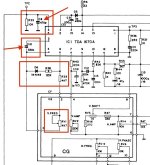
Here are my notes. the arrowed caps are the ones that i had an issue with. The boxed parts are what i was checking and replacing diodes/resistors wise earlier. Didnt need to change the TDA1670 or the TDA2595. I think it was C10 that was my issue more than C8, but i swapped both anyway.


mtc9000 vertical sync issue checks.jpg
 
Top