You are using an out of date browser. It may not display this or other websites correctly.
You should upgrade or use an alternative browser.
You should upgrade or use an alternative browser.
Lunar Lander controller
- Thread starter sferigan
- Start date


Does the db9 connector plug into a usb adapter or will it use a different cable?
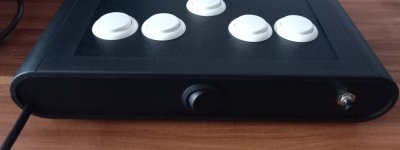
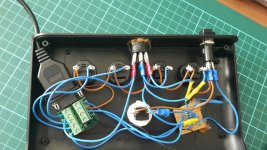
The controller DB9 connector plugs into an adapter thats using a Raspberry Pi Pico to convert it to USB and present itself as a game controller on the PC side. This makes for a nice low cost and very configurable solution to allow cross-platform use of my controllers.
Nice

Sure thing @chubsta, here you go!
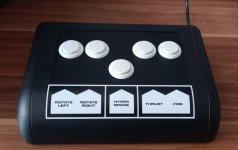
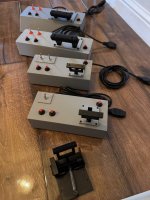
Lunar Lander was one of the first videogames I played bitd, having previously spend my arcade time playing electro mechanical machines (shooting games, helicopter games etc). The controller is something I designed to replicate my Lunar Lander arcade experience on the Vectrex in all it's vector glory courtesy of the PiTrex and VecFever cartridges. The controller provides a similar control scheme to a real Atari Lunar Lander cp. I've been exclusively posting about it (and making/selling some) over on the Vectrex Fans Unite! fb group - https://www.facebook.com/groups/vectrex
When I designed it I had a plan to make it work on other platforms (specifically Mame) and found an awesome open source project - https://gp2040-ce.info/ that provides a very simple, but flexible, way to create a low latency Pi Pico powered controller/joystick to USB interface.
Looking ahead I plan to make a range of game-focussed controllers covering some of the amazing arcade (and other) games that I've enjoyed over the years. An example is the next one I've started work on which aims to replicate the Battlezone cp.
lmk if there's anything else you'd like to know
Lunar Lander was one of the first videogames I played bitd, having previously spend my arcade time playing electro mechanical machines (shooting games, helicopter games etc). The controller is something I designed to replicate my Lunar Lander arcade experience on the Vectrex in all it's vector glory courtesy of the PiTrex and VecFever cartridges. The controller provides a similar control scheme to a real Atari Lunar Lander cp. I've been exclusively posting about it (and making/selling some) over on the Vectrex Fans Unite! fb group - https://www.facebook.com/groups/vectrex
When I designed it I had a plan to make it work on other platforms (specifically Mame) and found an awesome open source project - https://gp2040-ce.info/ that provides a very simple, but flexible, way to create a low latency Pi Pico powered controller/joystick to USB interface.
Looking ahead I plan to make a range of game-focussed controllers covering some of the amazing arcade (and other) games that I've enjoyed over the years. An example is the next one I've started work on which aims to replicate the Battlezone cp.
lmk if there's anything else you'd like to know
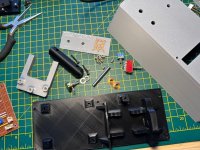
A little more tech detail:
The throttle lever mimics the Vectrex analogue joystick from centre to fully up. The left/right buttons operate as analogue joystick fully left/right or (via one of the switches) buttons 1/2. This allows the controller to work with appropriate Vectrex games that use either joystick or buttons 1/2 for left/right (eg. Moon Lander).
For menu navigation the joystick Y axis can also be switched to two (up/down) buttons on the rear of the controller, where button 3 can also be found.
The throttle lever mimics the Vectrex analogue joystick from centre to fully up. The left/right buttons operate as analogue joystick fully left/right or (via one of the switches) buttons 1/2. This allows the controller to work with appropriate Vectrex games that use either joystick or buttons 1/2 for left/right (eg. Moon Lander).
For menu navigation the joystick Y axis can also be switched to two (up/down) buttons on the rear of the controller, where button 3 can also be found.
👉 exactly what i did with my diy asteroids cabaret controller for the vectrex, a switch for L/R or 1/2.A little more tech detail:
The throttle lever mimics the Vectrex analogue joystick from centre to fully up. The left/right buttons operate as analogue joystick fully left/right or (via one of the switches) buttons 1/2. This allows the controller to work with appropriate Vectrex games that use either joystick or buttons 1/2 for left/right (eg. Moon Lander).
For menu navigation the joystick Y axis can also be switched to two (up/down) buttons on the rear of the controller, where button 3 can also be found.