

WARNING : To the IT experts here, this is simpleton stuff. Best not bother reading the write up below.
BOOTABLE USB
For years I have struggled to boot my various PCs (My everyday PC, Wife's everyday PC, 2 Player Mame Cab PC and Spinner Mame Cab PC) with a USB Stick.
Have had no problems writing ISO to USB Key with software RUFUS but the USB would not boot. Found that various options on BIOS have to be perfect (Boot Mode, Raid Off etc) before the USB will boot up. Once I got the BIOS setting correct, the Bootable USB worked.
So from there I thought I'd try to create TWO MULTIBOOT USBs. Tried many of the free software out there for this purpose but something or other would not work until I bumped into and tried WINSETUPFROMUSB.
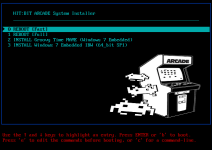
MULTIBOOT USB No 1 : ARCADE INSTALLER
MULTIBOOT USB No 2 : Backups via ACRONIS and MACRIUM REFLECT
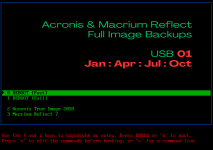
This USB is 256gb (Integral USB 3.0). Around £12 from Amazon.
So this I can boot into Acronis and make a Image onto the USB.
Then I can reboot into Macrium Reflect and make an Image onto the USB.
So I make 2 copies of the system (one Acronis, one Macrium Reflect) of each of the 4 PCs I "look after".
All 8 images, in my case, fit onto the USB.
ADVICE
The boot menu's have been edited by me to change BACKGROUND, COLOURS and POSITION MENU ITEMS.
For adding a ISO to the menu using WINSETUPFROMUSB, I like using Option 4 as shown below:
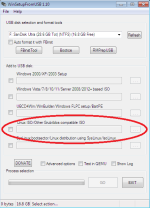
Using this, the software just adds a few lines into a file called MENU.LST and copies the ISO to a ISO FOLDER on the USB.
So deleting the ISO is as easy as delete the ISO and delete the menu lines in the text file.
Hope that helps. Ask for info here or send me a PM if you want.
BOOTABLE USB
For years I have struggled to boot my various PCs (My everyday PC, Wife's everyday PC, 2 Player Mame Cab PC and Spinner Mame Cab PC) with a USB Stick.
Have had no problems writing ISO to USB Key with software RUFUS but the USB would not boot. Found that various options on BIOS have to be perfect (Boot Mode, Raid Off etc) before the USB will boot up. Once I got the BIOS setting correct, the Bootable USB worked.
So from there I thought I'd try to create TWO MULTIBOOT USBs. Tried many of the free software out there for this purpose but something or other would not work until I bumped into and tried WINSETUPFROMUSB.
MULTIBOOT USB No 1 : ARCADE INSTALLER
MULTIBOOT USB No 2 : Backups via ACRONIS and MACRIUM REFLECT
This USB is 256gb (Integral USB 3.0). Around £12 from Amazon.
So this I can boot into Acronis and make a Image onto the USB.
Then I can reboot into Macrium Reflect and make an Image onto the USB.
So I make 2 copies of the system (one Acronis, one Macrium Reflect) of each of the 4 PCs I "look after".
All 8 images, in my case, fit onto the USB.
ADVICE
The boot menu's have been edited by me to change BACKGROUND, COLOURS and POSITION MENU ITEMS.
For adding a ISO to the menu using WINSETUPFROMUSB, I like using Option 4 as shown below:
Using this, the software just adds a few lines into a file called MENU.LST and copies the ISO to a ISO FOLDER on the USB.
So deleting the ISO is as easy as delete the ISO and delete the menu lines in the text file.
Hope that helps. Ask for info here or send me a PM if you want.