
You are using an out of date browser. It may not display this or other websites correctly.
You should upgrade or use an alternative browser.
You should upgrade or use an alternative browser.
NAOMI 2 not booting with DIMM board connected
- Thread starter Lid
- Start date

I get the same issue on my Naomi 2 from time to time, a firm reseat of the dimm board always fixes it, check the white connectors both on the dimm and the Naomi are clear of dust and dirt and make sure its seated well, mine takes a bit of force to fit properly. The C29 supercap is prone to failing and leakage, you'd notice if you can't save settings on the game, it's part of a memory backup circuit.
It's probably worth replacing the cap as a precaution anyway, I bought mine here: eBay link
Chunksin2017-11-22 13:22:45
It's probably worth replacing the cap as a precaution anyway, I bought mine here: eBay link
Chunksin2017-11-22 13:22:45
In the words of Altered Beast "RISE FROM YOUR GRAVE"
It's been quite a while since I've logged in here. And also about the same amount of time since I looked at getting the ID3 machine running. I've now got a bit of time to look at things and also have 2 kid pestering me to get the driving game working so they can play.
I've come back to this almost 8 years on. Still not booting, unsurprisingly as I haven't done anything to fix it . Although screen part has been taken off the base to move it into the games room garage, with the pinball machine and DDR. All reattached and now back to where I was before with it not booting.
So the symptoms are the same as ordinally posted. With everything connected as pictured here, power on fans start, black screen, nothing happens no matter how long I leave it.
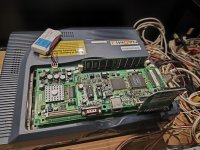
If I remove the top board (still not sure if I have the terminology correct but I think that's the NetDIMM part) and have it as in the picture below. I power on and the screen comes on straight away to the white Naomi background stating Error 22 "Communication error occurred between main board and option board". If I run a DIMM test from the service menu I get "DIMM Board Timeout". I assume the Error 22 and Timeout messages are correct as the board isn't connected.
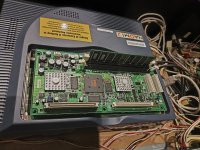
I've had a look around online and read a lot about the 3.3 voltage connection being very important on the Naomi boards. I tested the voltages at the connector on the back of the Naomi and I was getting 3.12v on the 3.3v and 4.97v on the 5v with the connectors plugged into the board. I was sure this was going to be the issue with the amount of people who said that's usually the cause. I adjusted the PSU to get them to bang on 3.3 and 5 with nothing connected. Now with the board connected and powered on they are 3.26v and 4.95v, so could probably go up a touch more, but I think from reading this is acceptable. Unfortunately still in exactly the same situation. The 12v is reading as 11.12 when the board is connected and powered on. Is this a problem? I don't have any way of adjusting the 12v as far as I can see.
I've reasted the memory stick and tried it in both slots. I've taken every board out from the Naomi cleaned, connector slots visually checked them and they don't appear dirty and then firmly re-seated everything multiple times. Still the same result.
I guess the next easiest thing to change would be the memory stick. But I don't have any spare so I will need to buy one. Just not sure if this is a likely cause, If I remove the memory stick and power on I get the same results as when it's in.
TLDR Version:
Issue:
- Black screen when powered on.
- Without the top board (DIMM I think is the correct term) boots straight away with error 22
Tested:
- Re-seated everything multiple times.
- Increased voltages from PSU. Could possibly increase slightly more but worried about damaging boards.
Help needed:
- Does anyone know if the above symptoms would likely be the memory stick as I haven't got a spare to test but can buy one if it's a possibility.
- Worth turning the voltages up a tiny bit more to hit 3.3v and 5v exactly when the board is connected and running?
- Is the low 12v likely to be a problem?
- Any other suggestions on what I can try?
I don't have any spare parts to swap in and out. I do have a pinball repair guy, fairly local, who says he also repairs arcade machines so if it's suspected to be a board fault I could see if he can do anything.
Appreciate I've not been part of the community for a while but any help would be greatly appreciated.
Thanks
Lid
It's been quite a while since I've logged in here. And also about the same amount of time since I looked at getting the ID3 machine running. I've now got a bit of time to look at things and also have 2 kid pestering me to get the driving game working so they can play.
I've come back to this almost 8 years on. Still not booting, unsurprisingly as I haven't done anything to fix it
. Although screen part has been taken off the base to move it into the games room garage, with the pinball machine and DDR. All reattached and now back to where I was before with it not booting.So the symptoms are the same as ordinally posted. With everything connected as pictured here, power on fans start, black screen, nothing happens no matter how long I leave it.
If I remove the top board (still not sure if I have the terminology correct but I think that's the NetDIMM part) and have it as in the picture below. I power on and the screen comes on straight away to the white Naomi background stating Error 22 "Communication error occurred between main board and option board". If I run a DIMM test from the service menu I get "DIMM Board Timeout". I assume the Error 22 and Timeout messages are correct as the board isn't connected.
I've had a look around online and read a lot about the 3.3 voltage connection being very important on the Naomi boards. I tested the voltages at the connector on the back of the Naomi and I was getting 3.12v on the 3.3v and 4.97v on the 5v with the connectors plugged into the board. I was sure this was going to be the issue with the amount of people who said that's usually the cause. I adjusted the PSU to get them to bang on 3.3 and 5 with nothing connected. Now with the board connected and powered on they are 3.26v and 4.95v, so could probably go up a touch more, but I think from reading this is acceptable. Unfortunately still in exactly the same situation. The 12v is reading as 11.12 when the board is connected and powered on. Is this a problem? I don't have any way of adjusting the 12v as far as I can see.
I've reasted the memory stick and tried it in both slots. I've taken every board out from the Naomi cleaned, connector slots visually checked them and they don't appear dirty and then firmly re-seated everything multiple times. Still the same result.
I guess the next easiest thing to change would be the memory stick. But I don't have any spare so I will need to buy one. Just not sure if this is a likely cause, If I remove the memory stick and power on I get the same results as when it's in.
TLDR Version:
Issue:
- Black screen when powered on.
- Without the top board (DIMM I think is the correct term) boots straight away with error 22
Tested:
- Re-seated everything multiple times.
- Increased voltages from PSU. Could possibly increase slightly more but worried about damaging boards.
Help needed:
- Does anyone know if the above symptoms would likely be the memory stick as I haven't got a spare to test but can buy one if it's a possibility.
- Worth turning the voltages up a tiny bit more to hit 3.3v and 5v exactly when the board is connected and running?
- Is the low 12v likely to be a problem?
- Any other suggestions on what I can try?
I don't have any spare parts to swap in and out. I do have a pinball repair guy, fairly local, who says he also repairs arcade machines so if it's suspected to be a board fault I could see if he can do anything.
Appreciate I've not been part of the community for a while but any help would be greatly appreciated.
Thanks
Lid
Another much smaller update on this,
I've bought a new stick of memory, as far as I could see any 168 pin PC133 memory should work. Still the same black screen with the new memory installed.
So now I'm out of ideas and assume it's something board related which is a bit beyond my abilities. Does anyone here repair Naomi boards where I can send off the whole stack of boards so they can work out what's going on?
Thanks for any help.
Liam
I've bought a new stick of memory, as far as I could see any 168 pin PC133 memory should work. Still the same black screen with the new memory installed.
So now I'm out of ideas and assume it's something board related which is a bit beyond my abilities. Does anyone here repair Naomi boards where I can send off the whole stack of boards so they can work out what's going on?
Thanks for any help.
Liam

The problem is related to the dimm. I haven’t read your post entirely but I have had a similar issue with a dimm. I removed the top board from the dimm and it gave error 22 even though the top board wasn’t faulty - worked fine on another dimm.
Looks like you have done almost everything.
Have you tried it without the CF drive plugged in - a faulty CF drive can give black screen on boot - that’s the only thing I can see that would be different on your set ups in the images.
Don’t despair though if none of this works, you should be able to replace a dimm rev 4.02 fairly easily - I can sort that if you need.
Looks like you have done almost everything.
Have you tried it without the CF drive plugged in - a faulty CF drive can give black screen on boot - that’s the only thing I can see that would be different on your set ups in the images.
Don’t despair though if none of this works, you should be able to replace a dimm rev 4.02 fairly easily - I can sort that if you need.

Don’t you have a Naomi cart ?
I would just make sure the Naomi 2
Is working first.
Then you can say the dimm is the issue , which it looks
To be .
I would just make sure the Naomi 2
Is working first.
Then you can say the dimm is the issue , which it looks
To be .

I was going to say the same, unplug just that CF drive thing connected to the SCSI and see if that makes a difference. As the Naomi boots with the top board removed, it's either that or the CF drive/card that seems to be causing the issue, not the Naomi itself.
It could be the combination of all together and a slightly low voltage at the board. I've read CF solutions will take slightly more juice and who knows how much that CF hardware draws as it's not official. I wouldn't tweak the voltages yet though until you've investigated the CF hardware more, and if you do it, test while under load and by minute amounts.. at the board.
Shame you don't have a cart as that would check the Naomi is working, or a GD-ROM as that would test the dimm.
You could look at netbooting as a cheap test if you have a laptop as you have the netdimm and firmware to enable that route to get the game into memory.
Don't lose hope, I feel there is a solution here somewhere.. and the game is worth it!
It could be the combination of all together and a slightly low voltage at the board. I've read CF solutions will take slightly more juice and who knows how much that CF hardware draws as it's not official. I wouldn't tweak the voltages yet though until you've investigated the CF hardware more, and if you do it, test while under load and by minute amounts.. at the board.
Shame you don't have a cart as that would check the Naomi is working, or a GD-ROM as that would test the dimm.
You could look at netbooting as a cheap test if you have a laptop as you have the netdimm and firmware to enable that route to get the game into memory.
Don't lose hope, I feel there is a solution here somewhere.. and the game is worth it!
Hi all,
Thanks for the replies. I'm fairly sure I've tried it with the top board in but the battery and CF card disconnected and get the black screen. But I will try again tomorrow and confirm.
I'm not sure what the pic chip is. But I'll do some searching tomorrow and also test this.
I don't have any cart or GD-Rom. This is how it was setup when I bought it.
I sort of think the issue starting coincided with me adding a subwoofer under the seat. I bought an additional board, subwoofer and wiring from someone on here. But that was years ago and I can't remember if it worked after that or not. I did try reversing the changes I made for the subwoofer, but it was so long ago I can't exactly remember what I did. Assuming this is unrelated.
I had already adjusted the voltages as they were all slightly down. They are still just slightly under when under load. But I don't want to increase anymore yet. Unless people think they need to go up a bit. The 12v is still low, but I have no adjustment dial for that on the PSU.
Would be happy to buy a new DiMM board to try if they aren't too expensive
Thanks for the replies. I'm fairly sure I've tried it with the top board in but the battery and CF card disconnected and get the black screen. But I will try again tomorrow and confirm.
I'm not sure what the pic chip is. But I'll do some searching tomorrow and also test this.
I don't have any cart or GD-Rom. This is how it was setup when I bought it.
I sort of think the issue starting coincided with me adding a subwoofer under the seat. I bought an additional board, subwoofer and wiring from someone on here. But that was years ago and I can't remember if it worked after that or not. I did try reversing the changes I made for the subwoofer, but it was so long ago I can't exactly remember what I did. Assuming this is unrelated.
I had already adjusted the voltages as they were all slightly down. They are still just slightly under when under load. But I don't want to increase anymore yet. Unless people think they need to go up a bit. The 12v is still low, but I have no adjustment dial for that on the PSU.
Would be happy to buy a new DiMM board to try if they aren't too expensive
You need to check The Naomi 2
Is working ..
To do that i would remove The net dimm.
You should have a Naomi 2 multi bios in the Naomi mother board , then get a cart of anyone to test it ?
Or if that dimm is a net dimm
You can try net booting,
Or A gd rom,
The Naomi has little dip switches that need to be set in the correct positions for either
Net boot / gd rom / normal cart boot . Make sure your boot mode dip switches are correct depending on which mode your using to boot A game b
Is working ..
To do that i would remove The net dimm.
You should have a Naomi 2 multi bios in the Naomi mother board , then get a cart of anyone to test it ?
Or if that dimm is a net dimm
You can try net booting,
Or A gd rom,
The Naomi has little dip switches that need to be set in the correct positions for either
Net boot / gd rom / normal cart boot . Make sure your boot mode dip switches are correct depending on which mode your using to boot A game b
His Naomi 2 boots without the Netdimm being attached, so the problem strongly points to the Netdimm or its peripherals being at fault.You need to check The Naomi 2
Is working ..
To do that i would remove The net dimm.
You should have a Naomi 2 multi bios in the Naomi mother board , then get a cart of anyone to test it ?
Or if that dimm is a net dimm
You can try net booting,
Or A gd rom,
The Naomi has little dip switches that need to be set in the correct positions for either
Net boot / gd rom / normal cart boot . Make sure your boot mode dip switches are correct depending on which mode your using to boot A game b
Yeh but booting the splashHis Naomi 2 boots without the Netdimm being attached, so the problem strongly points to the Netdimm or its peripherals being at fault.
Ain’t booting a game ,
I wouldn’t call it working till your playing a game on it.
Also , cf mode is this same dip setting as gd rom mode ?
Maybe his dips need setting right ?