Problem Silver Strike Bowling 2004 not recognising HDD Help

BigOliver

Newbie
Credits
2CR
Hi all,

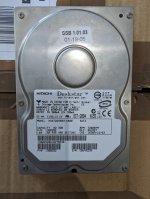
I got an early SSB (original 2004?) that doesn't work.
I narrowed down the original issue to be with the motherboard or CPU (maybe both)

The original motherboard was a D865 with Celeron 2.0GHz CPU

I bought a DQ965GF motherboard with Core 2 Duo 2.13GHz (As this was cheaper, and apparently works better and fast than the original. Also it apparently plays the later versions of SSB and maybe even other IT games) from eBay which loads the bios but hangs at the next step as it doesn't see any hard drive.

I have played around in the bios. I have cloned my HDD to a SSD. I have tried the Internet Archive Silver Strike Bowling 2005?
My version of SSB is 1.01.03 the Internet archive version I found is 1.01.05 so slightly later.
None of the versions or combinations work.

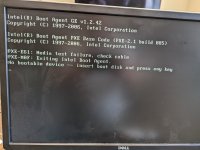
Error I receive is:
"PXE-E61: Media test failure, check cable"
"PXE-M0F: Exiting Intel Boot Agent"

See picture

I have tried 3 different cables.

It's entirely possible that the original HDD is corrupt or not working correctly, but I can access the data on my PC and I can clone it. Windows sees the whole drive and it looks very similar the the 1.01.05 version I found on archives. Also I get the same error on every HDD or image I try.

Has anyone came across this issue or can offer me any advice please?

I've put a fair bit of time and money into this project so I don't want to give up on it.

Also If anyone has any SSB HDD images they could share with me I would be extremely grateful.

I have uploaded my early SSB 1.01.03 image to Internet Archive, but I'm unsure if I'm allowed to share the link here? It wont work unless you have the ID dongle anyway.

Huge thanks in advance,

Oliver
 

Attachments
  • PXL_20240608_130002299.jpg
    PXL_20240608_130002299.jpg
    111.8 KB · Views: 13
  • PXL_20240608_112606898.jpg
    PXL_20240608_112606898.jpg
    88.1 KB · Views: 8
Last edited:

Spanky

Active member
Feedback
2 (100%)
Credits
589CR
The errors starting with PXE mean it is trying to boot from the network (and presumably there isn't a network). So that's a red herring.
I think run CHKDSK /F on that drive.
 

BigOliver

Newbie
Credits
2CR
The errors starting with PXE mean it is trying to boot from the network (and presumably there isn't a network). So that's a red herring.
I think run CHKDSK /F on that drive.
Thank you for your reply.

You are right about the PXE error, it was definitely a red herring. I can easily stop this by disabling boot from network in the bios.

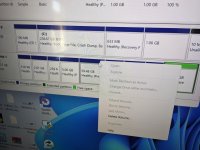
I'm not sure how to run CHKDSK /F on this, as the drive isn't given a volume.

See picture
 

Attachments

  • PXL_20240610_113431782.jpg
    PXL_20240610_113431782.jpg
    172.3 KB · Views: 7

Spanky

Active member
Feedback
2 (100%)
Credits
589CR
Thank you for your reply.

You are right about the PXE error, it was definitely a red herring. I can easily stop this by disabling boot from network in the bios.

I'm not sure how to run CHKDSK /F on this, as the drive isn't given a volume.

See picture
It's got no drive letter, right. Just click where it says Disk 1 in the interface, right-click and give it a drive letter there.
 

BigOliver

Newbie
Credits
2CR
Update:

I've now tested a Windows 10 SSD on this DQ965GF and I tested the SSB 1.01.03 image SSD on a known working pc.

The DQ965GF loaded to windows 10 and everything appeared fine.

The SSB SSD clone I created loaded to a screen that said:

"LILO 22.3.2 Loading RTAILinux
BIOS data check successful
Uncompressing Linux... Ok, booting the kernel."

It hung here. I obviously didn't expect it to load all the way, but it sends to have got future than on the DQ965GF. At least this has a successful BIOS check and compresses Linux ok.

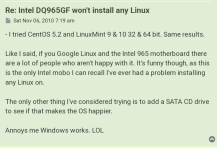
I read online that the DQ965GF doesn't like Linux, but I've also read here that people do use this motherboards with SSB.

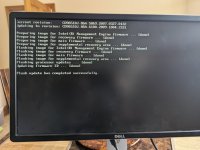
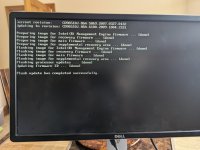
I then flashed to the latest BIOS. It was successful. I can still load up Win10 but when I tried the SSB SSD it still couldn't see the HDD/SSD just like before.

I wonder if I need a different SSB image with this slightly newer motherboard. A member of this group kindly offered to sell me an image of SSB 2007, but I don't want to pay $50 if it's only going to be the same issue.

As always help would be much appreciated
 

Attachments

  • PXL_20240610_152311109.jpg
    PXL_20240610_152311109.jpg
    116.4 KB · Views: 6
  • PXL_20240610_153044548.jpg
    PXL_20240610_153044548.jpg
    136.2 KB · Views: 5
  • PXL_20240610_151705352.jpg
    PXL_20240610_151705352.jpg
    61.7 KB · Views: 4

BigOliver

Newbie
Credits
2CR
It's got no drive letter, right. Just click where it says Disk 1 in the interface, right-click and give it a drive letter there.
I've just tried this, but I'm not seeing any option. I'm on Windows 11 but I guess it's the same as Windows 10.
Where I can see an option to change dive letter and path, it is greyed out. See pictures.

The only option to change the drive letter is on my main C drive (containing my Wins 11), which obviously I don't want to change.
 

Attachments

  • PXL_20240610_162835783.jpg
    PXL_20240610_162835783.jpg
    148.6 KB · Views: 5
  • PXL_20240610_162826533.jpg
    PXL_20240610_162826533.jpg
    143.9 KB · Views: 11

BigOliver

Newbie
Credits
2CR
Hmm
Please do the following and let us know what it says:
DISKPART SELECT DISK 1 DETAIL DISK EXIT
Thank you so much for your help so far.

I have done this and took the attached picture of what it says.
 

Attachments

  • PXL_20240610_213507490.jpg
    PXL_20240610_213507490.jpg
    81.9 KB · Views: 12

Spanky

Active member
Feedback
2 (100%)
Credits
589CR
Right. Looks like it's using a file system that Windows doesn't recognise. I think at this point, you'll have to find a Linux person nerd. One with a beard and sandals. It's starting to get out of my comfort zone.
 

BigOliver

Newbie
Credits
2CR
Yeah it is a Linux system.

I'm starting to believe that the issue is that my motherboard not being capable of running Linux. Which is unsetting as I've read here that the DQ965GF is compatible.

I think I'll start a new post asking others for compatible motherboards, CPUs, IDs and Graphics Cards with the various games.
I obviously don't want to buy another non compatible mobo.

Thanks for taking the time to respond, I appreciate it.
 

TheDaddy

Senior Member
vacBacker
Feedback
14 (93%)
Credits
7,039CR
There is known issues with this board and linux , Have you tried updating the Bios ???

" Which is unsetting as I've read here that the DQ965GF is compatible " on here ?? Where ??

Dave.
 

BigOliver

Newbie
Credits
2CR
There is known issues with this board and linux , Have you tried updating the Bios ???

" Which is unsetting as I've read here that the DQ965GF is compatible " on here ?? Where ??

Dave.
Yeah I updated the bios to the latest I could find online, sadly it didn't help, but it's a good idea so thanks anyway.

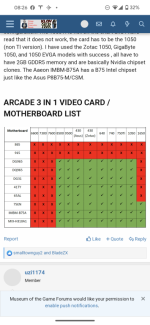
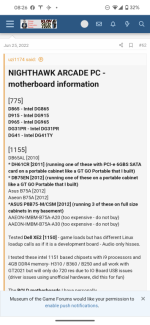
They was a compatibility list posted here, also someone said (here it maybe elsewhere, can't remember) that any D865 or D965 motherboard would work.

I still haven't fully given up on that the D965 yet, hopefully another version of SSB or an older bios will be compatible?

See attached pictures
 

Attachments

  • PXL_20240610_152311109.jpg
    PXL_20240610_152311109.jpg
    116.4 KB · Views: 5
  • Screenshot_20240611-082605.png
    Screenshot_20240611-082605.png
    103.3 KB · Views: 4
  • Screenshot_20240611-082635.png
    Screenshot_20240611-082635.png
    121 KB · Views: 5
  • Screenshot_20240610-125458.png
    Screenshot_20240610-125458.png
    207.4 KB · Views: 4

BigOliver

Newbie
Credits
2CR
Update:

I've picked up a DG31PR motherboard from eBay for £12.50.

This board is specifically mentioned on here so hopefully this will get me up and running.
If not it's only £12.50, worth that to find out lol.

Apparently it's a higher spec too, so could be a win, win! 🤞

I'll update again with the results
 
Top