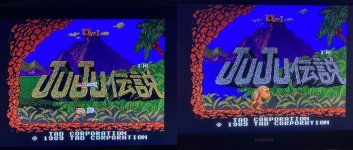
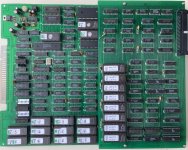
Made some more progress over the last couple of days ...
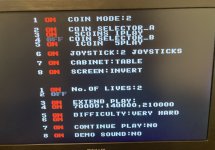
Definitely seem to have 5x bad LS245's at Jamma edge (2x for Dipswitches, 3x for inputs) but piggybacking is working for now so decided to continue the repair with just the one 245 piggybacked that handles the Coin and Player 1 Start inputs so I can coin up and start a game if needed. The others can wait till later ....
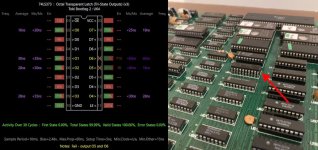
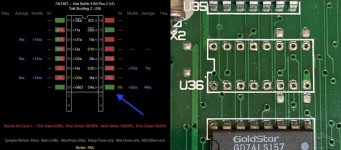
With activity all over the graphics RAM and ROMs I went looking for more TTL which may have obviously failed ... found a LS367 buffer @ U36 which had one of its outputs stuck to ground, despite a toggling input and the chip always enabled ... you can see it here on the slice test result, so it was removed and replaced ...
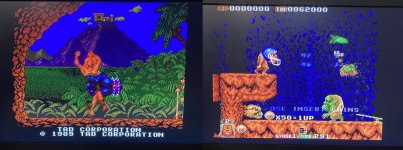
Which didn't make too much difference graphically ... before (below left) and after (below right) ....
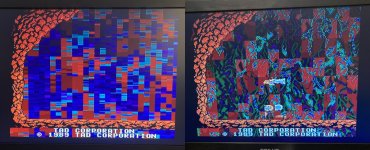
But no noticeable change to gameplay scenes so didn't feel like this fix accomplished much ... but probably another one of those little fixes you don't see the true benefit of at the time because other problems are hiding it ...
I did get some improvements on screen when I removed the FG Tiles ROMs ... I could actually see the correct background during the opening scene ....
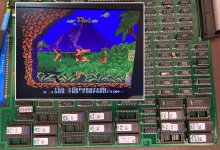
And this sent me down the rabbit hole of checking everything I could find, to do with those ROMs ... and spent a good few hours on that but couldn't find anything wrong ... Frustrated and not sure where to look next I decided to sort a few other things that I'd put on the back burner ...
Firstly, I replaced those five LS245's buffering inputs and dipswitches, which sorted those as expected ... wonder why those had all failed ? Over voltage maybe ? ... does seem to be an unusual amount of 245's that have failed on this board ...
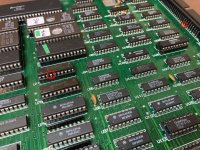
Secondly I had marked a LS153 @ U113 which I knew I had damaged back when the game wasn't booting .. I remember the little spark and pop when I accidentally bridged a couple of it's pins, but I knew it was just a chip in the video section and not responsible for the game not booting, I also Slice tested it at the time to see how bad it was and it passed! Ok then I obviously didn't completely murder it so it can't be causing to much chaos, so I marked it at the time with a little piece of yellow tape (you can see it on the above pic) and I thought I'll come back to that ... then kind of forgot about it while down other rabbit holes ... so had another look at it because I was thinking it surely can't be ok, it can't spark and pop and still be ok can it ? Signals looked fine on the scope and the pins I remembered bridging were unused ones (or so I thought) .... Let's double check ... so I got the working board out and Sliced that same chip ... here's the results from the 2 boards .... the bad chip I fried is below on the left, the working board one is on the right .....
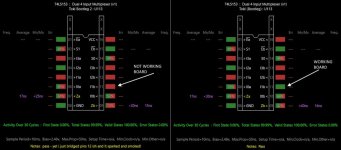
You can see why that result (on the left) on it's own would not raise suspicion ... Just looks like that input on pin 11 is not being used ...
But alongside analysis of the same chip on the working board, you can see what I'd done, I'd bridged pins 11 (GND) and 12 (+5v) ... blew the line and lost that ground signal on pin 11. This was confirmed when I removed the chip and saw the blown trace ...
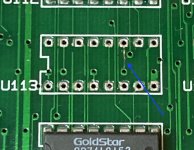
Put in a socket and replacement LS153, powered up and thought I'd cracked it ....
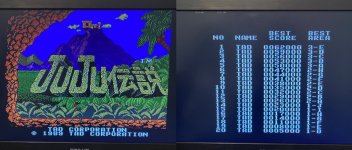
But soon realised all was still not well .....
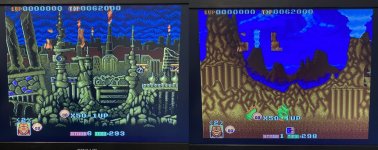
Now I've got perfect Background tiles and no Foreground tiles ... pretty much the opposite of before! ... while still the sprites tiles are chopped up and separated ...
A little confused and unsure of where to look next, I decided to do more Slice comparisons looking for different signals on TTL on the working board compared to this non-worker (beats a scope and pen and paper!).... and boy that was still some work, not just doing the tests but looking through the results ... eventually I came across this one ... the PAL @ U65 .... here's the comparison ...

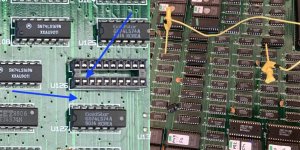
Missing INPUT signal on pin 18 ... ok looks promising, and again the beauty of having a working board is it's easier to find where that signal comes from ... and it traced to .... an LS273 @ U126 ... which is another IC that had been replaced and socketed by the previous fixer, same one responsible for the missing signals on the program RAM and ROM's ... On the pic below you can see pin 2 should connect to the via and carry the signal to the PAL on pin 18 ... well it didn't so I threw on a jumper wire ....
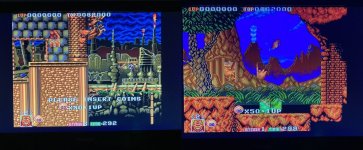
And fired up to Background Tiles AND Foreground Tiles !!!!
So despite saying to myself ages ago, don't trust any of the previous work done on this board, I carried on looking elsewhere for problems, and even though I have found some bad IC's that haven't been touched before, I think I really need to look at ALL the other previously replaced/socketed chips before doing anything else ... as I'm sure there will be more broken traces, ripped out vias and lost pads (just like I found when I removed the socket holding this LS273) ... which will probably be causing all these graphics problems .... tbc
Definitely seem to have 5x bad LS245's at Jamma edge (2x for Dipswitches, 3x for inputs) but piggybacking is working for now so decided to continue the repair with just the one 245 piggybacked that handles the Coin and Player 1 Start inputs so I can coin up and start a game if needed. The others can wait till later ....
With activity all over the graphics RAM and ROMs I went looking for more TTL which may have obviously failed ... found a LS367 buffer @ U36 which had one of its outputs stuck to ground, despite a toggling input and the chip always enabled ... you can see it here on the slice test result, so it was removed and replaced ...
Which didn't make too much difference graphically ... before (below left) and after (below right) ....
But no noticeable change to gameplay scenes so didn't feel like this fix accomplished much ... but probably another one of those little fixes you don't see the true benefit of at the time because other problems are hiding it ...
I did get some improvements on screen when I removed the FG Tiles ROMs ... I could actually see the correct background during the opening scene ....
And this sent me down the rabbit hole of checking everything I could find, to do with those ROMs ... and spent a good few hours on that but couldn't find anything wrong ... Frustrated and not sure where to look next I decided to sort a few other things that I'd put on the back burner ...
Firstly, I replaced those five LS245's buffering inputs and dipswitches, which sorted those as expected ... wonder why those had all failed ? Over voltage maybe ? ... does seem to be an unusual amount of 245's that have failed on this board ...
Secondly I had marked a LS153 @ U113 which I knew I had damaged back when the game wasn't booting .. I remember the little spark and pop when I accidentally bridged a couple of it's pins, but I knew it was just a chip in the video section and not responsible for the game not booting, I also Slice tested it at the time to see how bad it was and it passed! Ok then I obviously didn't completely murder it so it can't be causing to much chaos, so I marked it at the time with a little piece of yellow tape (you can see it on the above pic) and I thought I'll come back to that ... then kind of forgot about it while down other rabbit holes ... so had another look at it because I was thinking it surely can't be ok, it can't spark and pop and still be ok can it ? Signals looked fine on the scope and the pins I remembered bridging were unused ones (or so I thought) .... Let's double check ... so I got the working board out and Sliced that same chip ... here's the results from the 2 boards .... the bad chip I fried is below on the left, the working board one is on the right .....
You can see why that result (on the left) on it's own would not raise suspicion ... Just looks like that input on pin 11 is not being used ...
But alongside analysis of the same chip on the working board, you can see what I'd done, I'd bridged pins 11 (GND) and 12 (+5v) ... blew the line and lost that ground signal on pin 11. This was confirmed when I removed the chip and saw the blown trace ...
Put in a socket and replacement LS153, powered up and thought I'd cracked it ....
But soon realised all was still not well .....
Now I've got perfect Background tiles and no Foreground tiles ... pretty much the opposite of before! ... while still the sprites tiles are chopped up and separated ...
A little confused and unsure of where to look next, I decided to do more Slice comparisons looking for different signals on TTL on the working board compared to this non-worker (beats a scope and pen and paper!).... and boy that was still some work, not just doing the tests but looking through the results ... eventually I came across this one ... the PAL @ U65 .... here's the comparison ...
Missing INPUT signal on pin 18 ... ok looks promising, and again the beauty of having a working board is it's easier to find where that signal comes from ... and it traced to .... an LS273 @ U126 ... which is another IC that had been replaced and socketed by the previous fixer, same one responsible for the missing signals on the program RAM and ROM's ...
On the pic below you can see pin 2 should connect to the via and carry the signal to the PAL on pin 18 ... well it didn't so I threw on a jumper wire ....And fired up to Background Tiles AND Foreground Tiles !!!!
So despite saying to myself ages ago, don't trust any of the previous work done on this board, I carried on looking elsewhere for problems, and even though I have found some bad IC's that haven't been touched before, I think I really need to look at ALL the other previously replaced/socketed chips before doing anything else ... as I'm sure there will be more broken traces, ripped out vias and lost pads (just like I found when I removed the socket holding this LS273) ... which will probably be causing all these graphics problems .... tbc
Last edited: