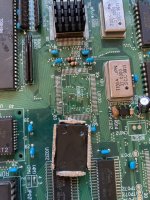
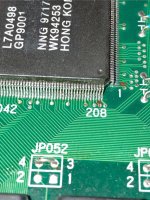
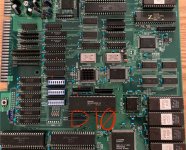
This is going to be a long one, this was a pretty hard repair...
But first some preface is needed about the situation with this game:
This is quite a late game, released in 1999 as the final game on the so-called "Toaplan V2" hardware, and it makes use of programmable CPLDs to handle many functions of the board.
These chips have a finite data retention period (e.g. one of them states 20 years in its datasheet), so they'll eventually lose their configuration and stop working, or just fail through other means.
Now since the CPLDs are reprogrammable, they're theoretically replaceable, but since they're all read protected and thus data can't be dumped from them, they're essentially just customs.
That was up until a couple of years ago, when someone (who's also able to dump these chips) came across a Chinese version of the game, which just so happened to have unprotected CPLDs!
So the data on all of them is now dumped and preserved (see here: https://forum.arcadeotaku.com/viewtopic.php?t=44361 and here: https://github.com/sergiopolog/bbakraid-cplds)
Now the only thing that's not replaceable on the board is the GP9001 graphics processor, but luckily it seems to be very reliable.
Coming back to my board, I bought it broken, it was obviously missing the XC95144 "TVRMCTL" CPLD.
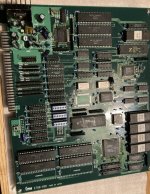
The board was caked in flux around all the SMD chips from a prior reflow attempt which is never good to see, but I could also see that the pads on the JTAG connector (CN011) were still intact, which likely meant nobody had tried replacing the CPLDs before (as external programmers for these chips are VERY expensive).
I installed a replacement XC95144:
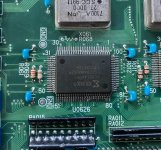
And then it took me a long, long time to figure out how to program it... There wasn't really any info online on how to do it, and the Xilinx software is probably the worst piece of software I've ever dealt with when it comes to troubleshooting issues, so it took a ton of trial and error.
I'll detail what ended up working for me on a Windows 10 system:
The three Xilinx CPLDs on this board can be programmed in-circuit, using a Xilinx Platform Cable USB I/II or clone, and the Xilinx Impact programming software.
You need to install Xilinx ISE 14.7, but NOT the Windows 10 version as it doesn't actually work on Windows 10 (don't ask), you need the Windows 7 version.
Follow this video, you need to screw about with a bunch of the program's files to actually get it to run
The software should install the programming cable's drivers automatically, if you run into issues with it not showing up in Impact, check this document https://docs.amd.com/v/u/en-US/ug344
You need to use a VERY short cable between your programmer and the JTAG connector on the board, I tried a 30cm one and it just errored out immediately, use one <10cm.
When you're ready to program, turn on the PCB and get everything connected up before opening Impact. Open it through the Windows search bar instead of through the main ISE program (it's easier that way). And make sure the PCB is running just under 5V, the programmer can apparently get damaged with higher voltages.
When Impact opens, it'll ask you if you want to create a new project automatically, just click yes, and then on the next screen with the 4 radio buttons, select "Configure devices using Boundary-Scan (JTAG)", and in the drop-down select "Automatically connect to a cable and identify Boundary-Scan chain".
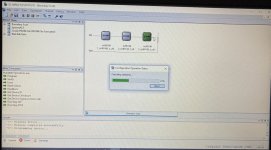
The three chips should show up like this, if they don't then you may need to mess around with your cable settings, then hit CTRL+I to re-initialise the chain.
In the Output -> Cable Setup menu, your cable should be auto-detected as "Platform Cable USB I/II". If it doesn't, your cable might not work (I had one clone that showed up as a different type, and nothing I did could get it to work, but another one worked perfectly first try)
You should be prompted at some point to load the configuration files, or you can right click on each chip and add them directly. Each of the .jed files from the github repo has a number at the start which corresponds to the order they show up in the JTAG chain, as you can see above.
Once they're loaded in, right click on the chip you need to program and select Erase, then Program, then Verify.
Now here's a couple of issues you may run into:
If the chips show up with "_unsupported" after their model name, they're either locked, or faulty. This confused me for a while and I thought it meant my programming setup didn't support the chips.
If one or two chips are missing from the scan, but others are showing up fine, then check the JTAG pins on each chip to make sure they're making good contact and aren't shorted or anything.
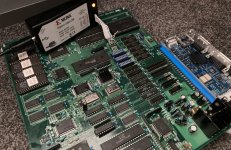
Programming setup ^
So... after all that I managed to program the new XC95144, and powered the board up for the first time, but I just got a black screen with no audio (but with a sync signal).
The ROMs all read fine, so I got my logic probe out and found that the 68K CPU was completely idle, but it had a clock signal and wasn't being held in RESET or HALT.
There was no activity on any chips connected up to the 68K, the Z80 was attempting to communicate with the sound ROM but that was about it.
At this point, my theory was that something was stopping the CPU from reading from the PRG ROM, so I focused on the other Xilinx CPLDs as I think they also handle some bus management tasks.
Part 2 below:
But first some preface is needed about the situation with this game:
This is quite a late game, released in 1999 as the final game on the so-called "Toaplan V2" hardware, and it makes use of programmable CPLDs to handle many functions of the board.
These chips have a finite data retention period (e.g. one of them states 20 years in its datasheet), so they'll eventually lose their configuration and stop working, or just fail through other means.
Now since the CPLDs are reprogrammable, they're theoretically replaceable, but since they're all read protected and thus data can't be dumped from them, they're essentially just customs.
That was up until a couple of years ago, when someone (who's also able to dump these chips) came across a Chinese version of the game, which just so happened to have unprotected CPLDs!
So the data on all of them is now dumped and preserved (see here: https://forum.arcadeotaku.com/viewtopic.php?t=44361 and here: https://github.com/sergiopolog/bbakraid-cplds)
Now the only thing that's not replaceable on the board is the GP9001 graphics processor, but luckily it seems to be very reliable.
Coming back to my board, I bought it broken, it was obviously missing the XC95144 "TVRMCTL" CPLD.
The board was caked in flux around all the SMD chips from a prior reflow attempt which is never good to see, but I could also see that the pads on the JTAG connector (CN011) were still intact, which likely meant nobody had tried replacing the CPLDs before (as external programmers for these chips are VERY expensive).
I installed a replacement XC95144:
And then it took me a long, long time to figure out how to program it... There wasn't really any info online on how to do it, and the Xilinx software is probably the worst piece of software I've ever dealt with when it comes to troubleshooting issues, so it took a ton of trial and error.
I'll detail what ended up working for me on a Windows 10 system:
The three Xilinx CPLDs on this board can be programmed in-circuit, using a Xilinx Platform Cable USB I/II or clone, and the Xilinx Impact programming software.
You need to install Xilinx ISE 14.7, but NOT the Windows 10 version as it doesn't actually work on Windows 10 (don't ask), you need the Windows 7 version.
Follow this video, you need to screw about with a bunch of the program's files to actually get it to run
You need to use a VERY short cable between your programmer and the JTAG connector on the board, I tried a 30cm one and it just errored out immediately, use one <10cm.
When you're ready to program, turn on the PCB and get everything connected up before opening Impact. Open it through the Windows search bar instead of through the main ISE program (it's easier that way). And make sure the PCB is running just under 5V, the programmer can apparently get damaged with higher voltages.
When Impact opens, it'll ask you if you want to create a new project automatically, just click yes, and then on the next screen with the 4 radio buttons, select "Configure devices using Boundary-Scan (JTAG)", and in the drop-down select "Automatically connect to a cable and identify Boundary-Scan chain".
The three chips should show up like this, if they don't then you may need to mess around with your cable settings, then hit CTRL+I to re-initialise the chain.
In the Output -> Cable Setup menu, your cable should be auto-detected as "Platform Cable USB I/II". If it doesn't, your cable might not work (I had one clone that showed up as a different type, and nothing I did could get it to work, but another one worked perfectly first try)
You should be prompted at some point to load the configuration files, or you can right click on each chip and add them directly. Each of the .jed files from the github repo has a number at the start which corresponds to the order they show up in the JTAG chain, as you can see above.
Once they're loaded in, right click on the chip you need to program and select Erase, then Program, then Verify.
Now here's a couple of issues you may run into:
If the chips show up with "_unsupported" after their model name, they're either locked, or faulty. This confused me for a while and I thought it meant my programming setup didn't support the chips.
If one or two chips are missing from the scan, but others are showing up fine, then check the JTAG pins on each chip to make sure they're making good contact and aren't shorted or anything.
Programming setup ^
So... after all that I managed to program the new XC95144, and powered the board up for the first time, but I just got a black screen with no audio (but with a sync signal).
The ROMs all read fine, so I got my logic probe out and found that the 68K CPU was completely idle, but it had a clock signal and wasn't being held in RESET or HALT.
There was no activity on any chips connected up to the 68K, the Z80 was attempting to communicate with the sound ROM but that was about it.
At this point, my theory was that something was stopping the CPU from reading from the PRG ROM, so I focused on the other Xilinx CPLDs as I think they also handle some bus management tasks.
Part 2 below: