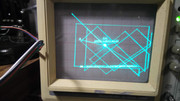
Battlezone... almost lost hope.

yorkshire_spam

Active member
vacBacker
Credits
763CR
So.... It feels like I've tested or replaced almost every IC on the Battlezone.
After I got my Data IO 29B working I checked all the PROMs (main and aux) and replaced 5 of them.

Then I found that the halt circuit was goosed, so I replaced the 74-74 @ M9.

That seemed like a step back - as the junk vectors I was getting vanished and I ended up with a very brief inverted L shape (vertical line upward from centre to X0,Y+ then a short line along +ve X) that flickered on just as the board reset.

I found that the _RESET was firing 42ms after the _VGGO signal. If I stick the fluke in the board and get it to loop writing to the _WDRESET address the board doesn't reset - so the whole wd and wdreset side of things is working fine.

I can only assume that the CPU is waiting for something from the state machine which causes a long pause between _WDRESET pulses and causes the PCB to reset.

So I set about checking the state machine.

With the logic comparator I see output differences on:

e6 74-670, f6 74-670, h6 74-670,f7 74-367, h7 74-367

But I think those are the outputs competing with each other.... as a check I replaced F7 and E6 with known good ICs but the "faults" on the logic comparator persist.

I found actual faults (IC fails test out of circuit) on:

B7 (74-86), c6 (74-00), f10 (74-191), b6 (74-14)

And I've reached the stage where the "game" screen looks like this:
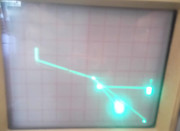


The "test mode" is trying, but still resetting.
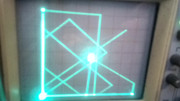


(I had to video the scope and frame grab this image... it's only there for a fraction of a second!)

Before I found the fault @ C6 I seemed to be getting nowhere - I've tested or replaced around 45 ICs on the board so far.... I was starting to run out of things to check and beginning to lose hope!

(Thanks to ColinD for keeping me going with handy hints!)
 

Bods

Senior Member
vacBacker
Feedback
4 (100%)
Credits
4,736CR
Still need to work on mine, i found one issue, most of the rom sockets all knackered so bought new ones, not got around to it yet though

About the same nightmares i found with Crossbow pcb, its got something like 50+ Roms with audio, only about 10 out the lot were good, expect odd ones but not nearly all of them
 

yorkshire_spam

Active member
vacBacker
Credits
763CR
virtvic said:
These Atari Vector games REALLY need an FPGA modern equivalent doing...

The AVG was Atari's attempt to encapsulate a load of the state machine logic into a single custom IC from what i remember.... and weren't they fun to reproduce a few years ago!

smiley2.gif
 

yorkshire_spam

Active member
vacBacker
Credits
763CR
Mark H said:
This may be one for Nad !

I'm bloody determined to sort it. Looking in the manual it looks like it's complaining that it can't find the mathbox - but also the grid isn't exactly as it should be.

I'll invert the X on the scope and figure out the Z-input bit.... then back to the board repair!
 

yorkshire_spam

Active member
vacBacker
Credits
763CR
Adjusting the x-bip/y-bip sorted the grid out. Picture on the scope looks bob-on now!

Reconnecting the aux board gives code "L" which indicates a low-byte fault on the mathbox.

But... it runs in game mode! Woohoo! (with the odd glitch in the vectors)

Problems:

1) My cheap-ass scope only has invert on the Y axis, not the X. So I'll maybe have to rig up the x-inv input on the board.

2) The z-out on the board seem to be doing sod all... so hooking it up to the blank input on the scope does beggar all

So happy it runs though!
 

Stevros

Active member
Credits
505CR
Well done, persistence has worked.
Sounds like it will be fully restored with the amount of ics you’ve replaced.
 

yorkshire_spam

Active member
vacBacker
Credits
763CR
It's glitching away all over the place... but it runs!

Filmed on my crappy camera phone, in crappy lighting conditions, on my crappy old "stand by" oscilloscope (my good one is broken!)

yorkshire_spam2019-05-02 10:17:37
 

yorkshire_spam

Active member
vacBacker
Credits
763CR
ColinD said:
Nice work so far.

Signature time for the mathbox and test cable perhaps ?

Thanks Col!

You could be right... I'l fetch it from the garage! This could be the first time I've actually used it (other than messing about when I first got it on a Centipede board)
 

yorkshire_spam

Active member
vacBacker
Credits
763CR
Update for this evening.... All 4 bitslice processor sockets AND the pokey socket replaced (that 40x5 pins desoldered and re-soldered!)

I stripped the interconnect cable apart and cleaned all the contacts 1 at a time (pins and the "clips" from the plug housings)

Then I found that the replacement prom I programmed for B1 is dead! So time to burn another one tomorrow.
 

yorkshire_spam

Active member
vacBacker
Credits
763CR
Something funny is going on here, burned a new prom (Harris rather than mmi) and it Tests OK in the reader, but outputs are floating when it's in the board. I wonder if the select/enable signal isn't giving a clean low? Logic probe says its pulsing.. I'll have to scope it and see for sure.
 

yorkshire_spam

Active member
vacBacker
Credits
763CR
A handy hint for anyone testing Battlezone on a 'scope....
The X and Y outputs have a built in facility to INVERT the display.

So if your scope is a cheap-ass one link mine that doesn't support "INV" on the inputs and you end up with a back-to-front image....

Simply ground pin 11 on the 7404 at H11 to invert the X axis.

(or pin 9 to invert the Y axis)

smiley1.gif
 

yorkshire_spam

Active member
vacBacker
Credits
763CR
FUTHERMUCKER!
I had it working... with scaled motion objects and the "off into the distance" writing... I even managed to coin it up and start a game.

And then it died..... Something is borked in the state machine (again)

Back to the drawing board.

yorkshire_spam2019-05-06 10:31:53
 

DanP

Administrator
Staff member
vacBacker
Feedback
5 (100%)
Credits
2,190CR
yorkshire_spam said:
A handy hint for anyone testing Battlezone on a 'scope....
The X and Y outputs have a built in facility to INVERT the display.

So if your scope is a cheap-ass one link mine that doesn't support "INV" on the inputs and you end up with a back-to-front image....

Simply ground pin 11 on the 7404 at H11 to invert the X axis.

(or pin 9 to invert the Y axis)

smiley1.gif

Even handier hint, these pins are also available on the edge connector. Atari set the inversion of image as part of the wiring harness, so for example a cabaret harness will have some extra wires in it to ground a couple of pins to disable the inverted image. Looking at the schematics there are pins K (YINV) and L (XINV) on the AVG board that look to be there for that.
 

ColinD

Active member
Feedback
6 (86%)
Credits
1,367CR
I had an issue with my asteroids with the display almost crumpling up into the middle like the display was on a piece of paper scrunched up.

This was down to that invert circuit and it was kind of in between states of invert / non invert.... maybe contaminated edge connector or something.... that was an odd one !!
 
Top