Bootable USB

RygarR

Active member
vacBacker
Feedback
3 (100%)
Credits
371CR
Evening All,

I'm trying to get my Mame rigs updated before tomorrow night's Hogmanay party.

The plan is to have them running Groovymame through Attract Mode

I have a new USB pendrive, Mr Chunksin's windows based ISO image, and a compatible set of ROMS.

I also have the latest version of RUFUS.

I'm using a Windows 10 PC to burn the image, but try as I might, I can't get RUFUS to work with the MBR formatting my Mame system needs to auto boot.

When I go through the steps as per the instructions, it fails at 99% because another process is trying to access the disk.

I've tried disabling windows explorer, the alt plus comma key combo, and checked that I'm not running any incompatible programmes.

When I do this, there's no conflict, but the process fails at 99% anyway because it's failed to extract the ISO image.

Is there something obvious I might be doing wrong here, or is there another programme that could work better?

Any pointers appreciated!
 

JonnyG

Active member
Credits
140CR
If I'm understanding the problem correctly and you've checked the ISO for errors, you could try using Win32DiskImager or Etcher to create the bootable USB.
 

RygarR

Active member
vacBacker
Feedback
3 (100%)
Credits
371CR
JonnyG said:
If I'm understanding the problem correctly and you've checked the ISO for errors, you could try using Win32DiskImager or Etcher to create the bootable USB.

Thanks Johnny,

I'll give em a try and see what happens.
 

chunksin

Active member
vacBacker
Feedback
21 (100%)
Credits
733CR
Are you formatting in fat32? I think I've had a failure in Rufus before and it still worked fine, you don't seem to get the error in earlier versions of Rufus
 

RygarR

Active member
vacBacker
Feedback
3 (100%)
Credits
371CR
Chunksin said:
Are you formatting in fat32? I think I've had a failure in Rufus before and it still worked fine, you don't seem to get the error in earlier versions of Rufus

Really? I didn't try the 'failed' burn out. Might as well give that a go. Think I'll download your image again as well just in case.

As for the formatting. If I select MBR, RUFUS doesn't give me the option of using fat32 or exfat. Only NTFS. Think I'll grab an earlier version of RUFUS and try that too.

Cheers
 

Ropi Jo

Active member
Feedback
2 (100%)
Credits
127CR
I use Rufus daily at work. It does not work on W10. Fails with various errors. We keep a W7 laptop specifically for Rufus, as do our American parent company. They are very clever poeple and do all of the software development for our products so if they can't make Rufus work on W10.....

I have noticed though, that after creating a bootable USB using Rufus on the W7 machine, Rufus will appear to work on that USB on W10 as long as it hasn't had software loaded onto it in the meantime.

All of the above is also true for the older HP Disk Formatting tool.

I've followed every 'fix' I can find to get around these problems but nothing has worked, including every version of each prog.

HTH.

Ropi Jo2019-12-31 10:01:44
 

chunksin

Active member
vacBacker
Feedback
21 (100%)
Credits
733CR
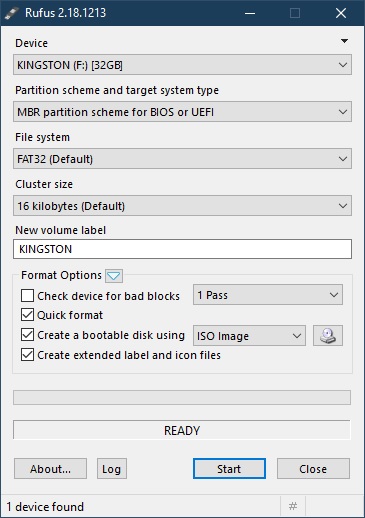
That's odd, I've used Rufus on Windows 10 for a couple of years and had no issues other than them removing the FAT32 option a while back, I stuck with version 2.18 and that seems to be fine. Maybe it's my Windows 10 release version, I'll double check later and report back.

Rufus.jpg


Chunksin2019-12-31 10:08:20
 

RygarR

Active member
vacBacker
Feedback
3 (100%)
Credits
371CR
Thanks for this guys.

Reassuring to hear I'm not totally useless!

I didn't have time to try out any alternativeslast night, but I did get a fresh copy of the ISO, and Rufus 2.8.

If I get a chance later, in amongst the hoovering and cushion flooring, I'll give it another whirl.

Cheers.

PS. Today's a very special day kids. If you go outside, and you keep your eyes peeled, if you're very, very lucky, you might just see a man with the same number of heads as there are days left in the year. Imagine that?!
 

Ropi Jo

Active member
Feedback
2 (100%)
Credits
127CR
@ Chunksin.... there is a difference somewhere but I'm bu**ered if I know what.

The reviews from the various fixes show that some people have had success while others have not. We have around a dozen W10 machines at work and more W10 laptops out with our mobile guys and we can't make it work on any of them.

It worked on all of our W7 machines, the only one of which is left is the lappy in my workshop.

@Rygar... do you have access to a W7 machine? Could be your simplest option.

Ropi Jo2019-12-31 10:26:38
 

chunksin

Active member
vacBacker
Feedback
21 (100%)
Credits
733CR
Just done some testing on my work PC and Ropi Jo you're right, 2.18 doesn't work on Windows 10 update 1903 - I can only think I'm running an older version of Windows 10 on my home laptop. The good news is I rolled back through the versions of Rufus and 2.10 seems to work fine so give that a go. Hope you get your PCs sorted in time
smiley20.gif


Rufus210.jpg
 

Ropi Jo

Active member
Feedback
2 (100%)
Credits
127CR
Hey Rygar, if you have any success following Chunksin's good info please would you let us know the W10 Revision and Rufus version that gives you the winning combination?
 

RygarR

Active member
vacBacker
Feedback
3 (100%)
Credits
371CR
Happy New Year Everyone!

I underestimated
the amount of tiding up on Tuesday, and didn't have time to sort this
out in the end, but the kids seemed happy enough with the 60-in-1. Seems
it's only me who isn't!

I've now had the chance to donwnload and try out a few additional versions of Rufus on my Windows 10 machine.

I'm rocking Windows 10 Pro

v. 1809

OS Build 17763.914

... and none of them worked :-(

I
don't know if it's my version of the OS, or the random combination of
software I'm running, but Rufus just won't complete the process.

However, all is not lost. When
doing the putting away after the party, I rediscovered an ancient XP
netbook I had hidden away at the back of a cupboard. So I'll give that a
go over the weekend.

Any tips on the settings I should use?

Thanks again...
 

chunksin

Active member
vacBacker
Feedback
21 (100%)
Credits
733CR
You can do it another way, download Macrium Reflect free version, create rescue media which will create a bootable USB for you then extract the 2 mrimg files from the ISO image and copy them onto the stick. The result should be the same as burning the ISO
 

RygarR

Active member
vacBacker
Feedback
3 (100%)
Credits
371CR
I've finally had the time to sit down and have a play with Macrium Reflect.

I hit a few snags, but by doing the following:

1) Formatting the USB stick as MBR with RUFUS

2) Creating rescue media on said USB stick using the advanced option for Windows 7

3) Dragging and dropping the two mrimg files from the previous, duff install into the newly created rescue media USB stick...

...it worked! So, many thanks for that!

Windows setup was a (very gentle) breeze after that (my MB only has USB 2!).

Unfortunately my graphics card isn't supported by the set up wizard - its a RADEON X600. Apparently, CRT Emudrivers only supports this on Windows XP and not Windows 7. The X600 does output 15 kHz - and is currently doing so through a USB booting Linux setup. As I was reading the instructions for the workaround, however, I remembered I had a few old GPUs in the loft, including a 4350! What I'd forgotten is that my system is so low powered, that there's no chance of it actually working :-(

Having read around online, there are plently of passively cooled cards, like the R5 220 and the HD 6450, which seem to fit the bill.

My next questions is - is there a quick workaround for the X600, or would it be simpler if I just ordered a 'new' GPU and used the install wizard?

Thanks again!
 

RygarR

Active member
vacBacker
Feedback
3 (100%)
Credits
371CR
So, a few weeks have passed...

I ordered a replacement GPU, and re-installed Groovytime. Things were looking great. But after an incident involving a cat and an uncased MB foolishly sat on the dining table, my PC died
smiley19.gif
That's the second piece of gaming shizz that's died on me in the past month. Maybe someone is trying to tell me something.

However, the good news is that I got a new (old) SFF PC off eBay. It's fitted with an A8 CPU with integrated R7 7600 GPU. And it seems to work perfectly with the CRT-Emudrivers! No need for extra cards.

The only thing missing is sound. I'll have to try to find the drivers.

Edit: Turns out the audio driver was fine all along. But the MB didn't like having the fp header unplugged, which is where I was trying to tap the line out signal. So I put the connector back. One 3.5 mm audio cable later, and some creative use of a pen knife and electrical tape, and the sound is working like a dream. I'll get it soldered into place at the weekend.

Cheers!RygarR2020-01-27 23:10:36
 
Top