

The project started out as a way to get Outrun and PowerDrift running in an original cab with no modifications and after exploring using a Raspberry Pi vs a PC I found after a lot of testing that the only way to run the game with decent performance and have outputs working - flashing start button lamp and shaker motor - I'd have to use a PC. Outrun and PowerDrift can run really well on the Pi after a bit of tweaking so if you weren't bothered about the outputs the solution is much cheaper and smaller!
The PC hardware is a Dell Optiplex SFF 7010 running a 3.3Ghz i5 processor and 4GB of RAM, it fits really nicely onto the PCB shelf in the PowerDrift cab so is an ideal form factor. It runs an ATI HD7450 graphics card using Calamity's 15Khz drivers and flashed to 15Khz only on boot and uses the on board sound card.
The video signal needs to be boosted from 1v to 4v for the arcade monitor so I used an Ultimarc video amplifier, this also needed an additional 5v which is provided from a little USB breakout adaptor. Because the card is DVI-I I needed to add a DVI-VGA adaptor and a gender changer to plug in the video amp card. The video cables then feed into a 5 way JST plug for red, green, blue, sync and ground.
Sound can simply be fed direct from the PC headphone socket, I used a little 3.5mm adaptor with screw terminals which feeds into a 4-way JST plug. I was slightly concerned about doing this but after reading up on it headphone output is so close to line level out it makes very little difference and is no risk to the cab's amplifier.
I then needed to interface the cab controls to the PC, I could have bought an Ultimarc A-Pac and a LEDWiz or UHID/PacDrive but I found a nifty project that allows you to use an Arduino board to handle analog and digital inputs and outputs all in one solution. It was relatively simple to customise the setup for my needs and in the end I settled on a 3-axis controller, 8 inputs and 4 outputs on a Leonardo clone board. You need to compile and flash the custom firmware to the Arduino which then appears as 3 separate HID devices in Windows. Full details are here: http://www.ukvac.com/forum/custom-arduino-firmware-lwcloneu2_topic369055.html
I added a little screw terminal breakout board to make it easier for testing but you can make up proper connectors to fit over the Arduino pins to make things neater. Another advantage is that it gives a couple of extra 5v and ground terminals which you need to wire up the pots. One little quirk of the code is that all three pots need to be connected to the Arduino at the same time otherwise you get some very odd readings! I used three cheap 5k pots from eBay for testing everything and some prototyping cable with dupont connectors. I also built a little ground rail for the Arduino due to lack of available terminals on the Arduino itself, all grounds from the buttons need to connect back to the Arduino and button inputs connect to the digital inputs.
I used a great guide written by Smarty when he built an Outrun to PowerDrift loom which detailed the pinouts of the connectors and I double checked everything with the cab schematics to be sure I wasn't going to break anything! I'll post up the full list later on. I used the same plugs and pins that he detailed in his post here: http://www.ukvac.com/forum/sega-outrun-in-a-power-drift-cab-how-to_topic347917.html. One thing to note is that this is designed to work on a PowerDrift cab that has a filter board making connections much easier. Outrun cabs don't have this so you'd need to use either male headers or use a row of long header pins as a gender changer to plug the 2 female plugs together.
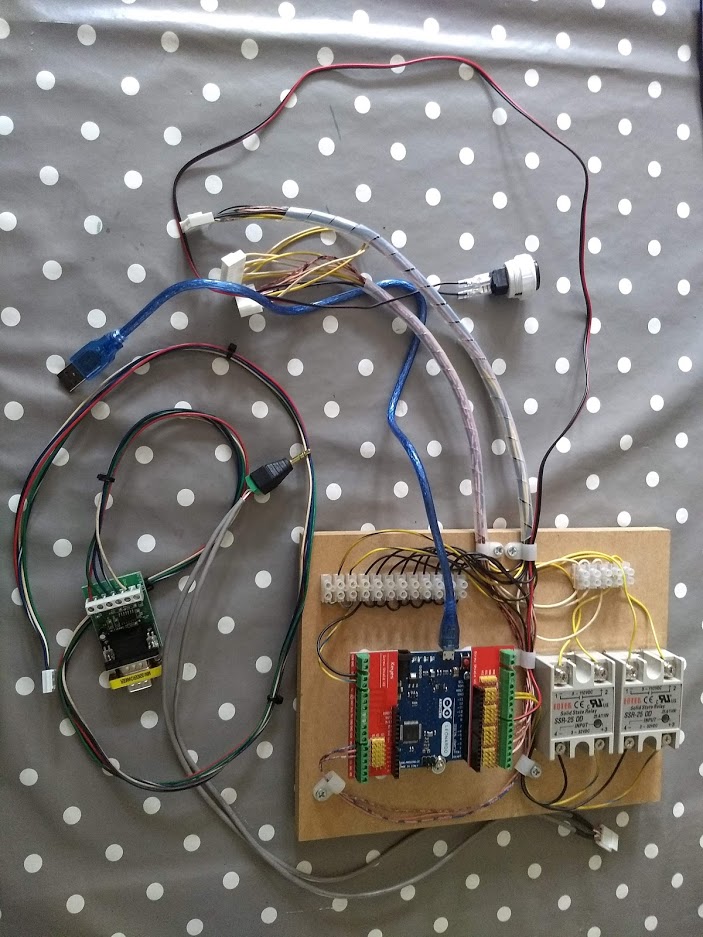
The outputs took a bit of head scratching to work out, I knew that the cabs already have solid state relays to switch the lamp and motor on but I didn't want to risk any damage to the Arduino board. I started off with a cheap little 2-way relay board that has a built in protection diode and an optocoupler which you need because the Arduino only puts out 5v at a few milliamps which isn't enough to trigger the relay. The wiring got complicated and messy, plus the relays make an audible click that would be heard from outside the cab so I switched to using solid state relays instead. They only need 5ma to trigger which is well within the 40ma per pin spec of the Arduino and they are totally silent. Maybe I went a bit overboard with the spec at 25 amps but they will probably last forever and were cheap enough.
The cabs outputs operate when a 5v signal is detected so I fed 5v into one side of the relay from the PSU and a wire from the relay output back into the 5v feed for the outputs. The Arduino is configured as a LEDWiz device which in turn is controlled by MameHooker running on the PC, when an output event is detected it sends 5v to the relay and opens the circuit to allow 5v to flow into the cabs internal relay and activate the lamp or motor, it works really well with no lag at all.
Software wise I used Windows 7 Embedded 64-bit running Application Compatibility Template operating in Read-Only mode, Calamity 15Khz drivers, GroovyMame 207, Attract Mode and MameHooker 5.1. I've got a full backup of the software image and the firmware used for the Arduino that I'm happy to share if anyone else wants to give it a go. The menu is controlled with the steering wheel and start button and I rigged up the test button on the cab as an exit button although you can just wire up an extra button for that if you wanted, or even a combination like hold start and press accelerator. I added a whole bunch of games which were whittled down to around 40 that worked well in Mame with the cab controls, once everything is set up you need to manually modify the games .cfg file to set the gear shift style to non toggle (toggle=no) - the shifter has a single switch for Hi-Lo gear, if you don't set this you need to double shift to change gear.
If you were going to use a Pi the setup is slightly simpler, I used advmame 3 as the emulator and overlocked the Pi to get PowerDrift running properly with no frame skips or sound issues - again I have this config if anyone needs it, the Arduino works exactly the same way on the Pi as it presents as HID devices. You could also do it without the Arduino and use an Analog Zero hat to handle everything and have a really compact solution. That also presents to the Pi as a 3 axis controller and digital inputs, code for that is available here: https://github.com/chunksin/analogjoy and will be included in the next DIY pi2jpac image.
The PC hardware is a Dell Optiplex SFF 7010 running a 3.3Ghz i5 processor and 4GB of RAM, it fits really nicely onto the PCB shelf in the PowerDrift cab so is an ideal form factor. It runs an ATI HD7450 graphics card using Calamity's 15Khz drivers and flashed to 15Khz only on boot and uses the on board sound card.
The video signal needs to be boosted from 1v to 4v for the arcade monitor so I used an Ultimarc video amplifier, this also needed an additional 5v which is provided from a little USB breakout adaptor. Because the card is DVI-I I needed to add a DVI-VGA adaptor and a gender changer to plug in the video amp card. The video cables then feed into a 5 way JST plug for red, green, blue, sync and ground.
Sound can simply be fed direct from the PC headphone socket, I used a little 3.5mm adaptor with screw terminals which feeds into a 4-way JST plug. I was slightly concerned about doing this but after reading up on it headphone output is so close to line level out it makes very little difference and is no risk to the cab's amplifier.
I then needed to interface the cab controls to the PC, I could have bought an Ultimarc A-Pac and a LEDWiz or UHID/PacDrive but I found a nifty project that allows you to use an Arduino board to handle analog and digital inputs and outputs all in one solution. It was relatively simple to customise the setup for my needs and in the end I settled on a 3-axis controller, 8 inputs and 4 outputs on a Leonardo clone board. You need to compile and flash the custom firmware to the Arduino which then appears as 3 separate HID devices in Windows. Full details are here: http://www.ukvac.com/forum/custom-arduino-firmware-lwcloneu2_topic369055.html
I added a little screw terminal breakout board to make it easier for testing but you can make up proper connectors to fit over the Arduino pins to make things neater. Another advantage is that it gives a couple of extra 5v and ground terminals which you need to wire up the pots. One little quirk of the code is that all three pots need to be connected to the Arduino at the same time otherwise you get some very odd readings! I used three cheap 5k pots from eBay for testing everything and some prototyping cable with dupont connectors. I also built a little ground rail for the Arduino due to lack of available terminals on the Arduino itself, all grounds from the buttons need to connect back to the Arduino and button inputs connect to the digital inputs.
I used a great guide written by Smarty when he built an Outrun to PowerDrift loom which detailed the pinouts of the connectors and I double checked everything with the cab schematics to be sure I wasn't going to break anything! I'll post up the full list later on. I used the same plugs and pins that he detailed in his post here: http://www.ukvac.com/forum/sega-outrun-in-a-power-drift-cab-how-to_topic347917.html. One thing to note is that this is designed to work on a PowerDrift cab that has a filter board making connections much easier. Outrun cabs don't have this so you'd need to use either male headers or use a row of long header pins as a gender changer to plug the 2 female plugs together.
The outputs took a bit of head scratching to work out, I knew that the cabs already have solid state relays to switch the lamp and motor on but I didn't want to risk any damage to the Arduino board. I started off with a cheap little 2-way relay board that has a built in protection diode and an optocoupler which you need because the Arduino only puts out 5v at a few milliamps which isn't enough to trigger the relay. The wiring got complicated and messy, plus the relays make an audible click that would be heard from outside the cab so I switched to using solid state relays instead. They only need 5ma to trigger which is well within the 40ma per pin spec of the Arduino and they are totally silent. Maybe I went a bit overboard with the spec at 25 amps but they will probably last forever and were cheap enough.
The cabs outputs operate when a 5v signal is detected so I fed 5v into one side of the relay from the PSU and a wire from the relay output back into the 5v feed for the outputs. The Arduino is configured as a LEDWiz device which in turn is controlled by MameHooker running on the PC, when an output event is detected it sends 5v to the relay and opens the circuit to allow 5v to flow into the cabs internal relay and activate the lamp or motor, it works really well with no lag at all.
Software wise I used Windows 7 Embedded 64-bit running Application Compatibility Template operating in Read-Only mode, Calamity 15Khz drivers, GroovyMame 207, Attract Mode and MameHooker 5.1. I've got a full backup of the software image and the firmware used for the Arduino that I'm happy to share if anyone else wants to give it a go. The menu is controlled with the steering wheel and start button and I rigged up the test button on the cab as an exit button although you can just wire up an extra button for that if you wanted, or even a combination like hold start and press accelerator. I added a whole bunch of games which were whittled down to around 40 that worked well in Mame with the cab controls, once everything is set up you need to manually modify the games .cfg file to set the gear shift style to non toggle (toggle=no) - the shifter has a single switch for Hi-Lo gear, if you don't set this you need to double shift to change gear.
If you were going to use a Pi the setup is slightly simpler, I used advmame 3 as the emulator and overlocked the Pi to get PowerDrift running properly with no frame skips or sound issues - again I have this config if anyone needs it, the Arduino works exactly the same way on the Pi as it presents as HID devices. You could also do it without the Arduino and use an Analog Zero hat to handle everything and have a really compact solution. That also presents to the Pi as a 3 axis controller and digital inputs, code for that is available here: https://github.com/chunksin/analogjoy and will be included in the next DIY pi2jpac image.


