New ZVG Menu release

chadsarcade

Lord of Vectors (tm)
Feedback
11 (100%)
Credits
443CR
UKVAC Exclusive! :)

For the 1-2 other people out there with a ZVG cab... I've been giving the ZVG menu some attention recently and thought it's time I released a new version:

https://github.com/ChadsArcade/VMMenu/releases/tag/v1.5

Loads added since the previous release:

Show/Hide games from within the vector menu

Customise colours from within the vector menu

Updated settings page

Overhauled mouse/spinner controls

For those looking to add a spinner, I've been experimenting with Arduinos and photoelectric rotary encoders. You can find my musings here:

https://github.com/ChadsArcade/Mame-Spinner

Feedback welcomed...

Chad

Cab-Spinner.jpg


chadsarcade2020-02-11 15:53:39
 

chadsarcade

Lord of Vectors (tm)
Feedback
11 (100%)
Credits
443CR
petercasino said:
I noticed in the README you've updated the Linux version of the menu. Does the Linux version of VectorMAME run any better than the DOS one?

I tried building a Linux ZVG cab recently to answer this very question. My findings are in the same Readme... basically stick with DOS.

The Linux Vector Mame build I have is binary only, I never got the src off the guy who ported it. The ZVG drivers don't support ECP, so you get a lot of slowdown on vector intense screens. Some of the games also have issues, and it doesn't support the keyboard LEDs so you don't get the flashing start buttons. On the plus side, on board sound just works without needing archaic sound cards and DOS drivers ;)

I develop and build under Linux as it's easier, the Linux menu also (or alternatively) renders to the computer screen so you don't need to be hooked up to the ZVG to check and test things. Once I'm happy it's all working I drop into an XP virtual machine and compile the DOS port from the same source code. If anyone can enlighten me on how to build for DOS under Linux please let me know...

My ZVG cabs run from CF cards so then it's just a case of copying the new menu file onto the card, sticking it back in the cab and you're good to go,

Having just built a spinner, this version properly supports it to navigate the menus (or a trackball, Quantum owners...) rather than the previous effort which I was only able to test with a mouse. It should finally work nicely in a Tempest cab.

Chad
 

chadsarcade

Lord of Vectors (tm)
Feedback
11 (100%)
Credits
443CR
DanP said:
Cool, will give it a runout. Still waiting on a MV CPO to build my spinner panel...

Thanks Dan, still worth the upgrade even if you don't have a MV CP. Do you have a Takeman CP but just no overlay? I think they ended up being printed and shipped by "thisoldgame" as the original interest list was going nowhere after about 6 years. Not sure if they just fulfilled the order list, or made spares for general sale. If there's a decent scan on the original Klov thread you'd probably be better going to Muddy,
 

petercasino

Active member
vacBacker
Feedback
8 (100%)
Credits
193CR
chadsarcade said:
petercasino said:
I noticed in the README you've updated the Linux version of the menu. Does the Linux version of VectorMAME run any better than the DOS one?

I tried building a Linux ZVG cab recently to answer this very question. My findings are in the same Readme... basically stick with DOS.

The Linux Vector Mame build I have is binary only, I never got the src off the guy who ported it. The ZVG drivers don't support ECP, so you get a lot of slowdown on vector intense screens. Some of the games also have issues, and it doesn't support the keyboard LEDs so you don't get the flashing start buttons. On the plus side, on board sound just works without needing archaic sound cards and DOS drivers ;)

I develop and build under Linux as it's easier, the Linux menu also (or alternatively) renders to the computer screen so you don't need to be hooked up to the ZVG to check and test things. Once I'm happy it's all working I drop into an XP virtual machine and compile the DOS port from the same source code. If anyone can enlighten me on how to build for DOS under Linux please let me know...

My ZVG cabs run from CF cards so then it's just a case of copying the new menu file onto the card, sticking it back in the cab and you're good to go,

Having just built a spinner, this version properly supports it to navigate the menus (or a trackball, Quantum owners...) rather than the previous effort which I was only able to test with a mouse. It should finally work nicely in a Tempest cab.

Chad

Ah Ok, thanks for the info. I was going to give the Linux route a go but I'll leave it now.

It's a shame it's so difficult to find motherboards that are compatible with ZVG (in DOS) and are performant. I had a motherboard that worked really well but unfortunately it died. I eventually found another one that works but the performance isn't as good. Any recommendations of motherboards that work well?

petercasino2020-02-11 20:55:05
 

chadsarcade

Lord of Vectors (tm)
Feedback
11 (100%)
Credits
443CR
petercasino said:
It's a shame it's so difficult to find motherboards that are compatible with ZVG (in DOS) and are performant. I had a motherboard that worked really well but unfortunately it died. I eventually found another one that works but the performance isn't as good. Any recommendations of motherboards that work well?

The performance bottlenecks are probably with the parallel port/ZVG board rather than the emulation.

I've found most motherboards I've tried work OK, provided they have a PCI slot you should be able to get a soundcard working OK (I use a CT4810 sound blaster). I disable any on board peripherals in the BIOS that I don't need (Network, soundcard, extra SATA ports etc) to help free up resources.

If the BIOS doesn't have options to reserve or set IRQs then that can cause difficulties, as many devices may share IRQs and that can lead to problems. I have such a board, it's fine unless I add a USB spinner, then Mame stutters and crashes, USB clashes with the sound card IRQ I think. I use an IPAC for controls, but via a PS/2 connection.

I vaguely recall having issues with the keyboard LEDs on one board, not sure if that was down to using the IPAC via USB or now.

I've not tried anything as new as a UEFI board so can't speak for those.

What sort of issues have you found?

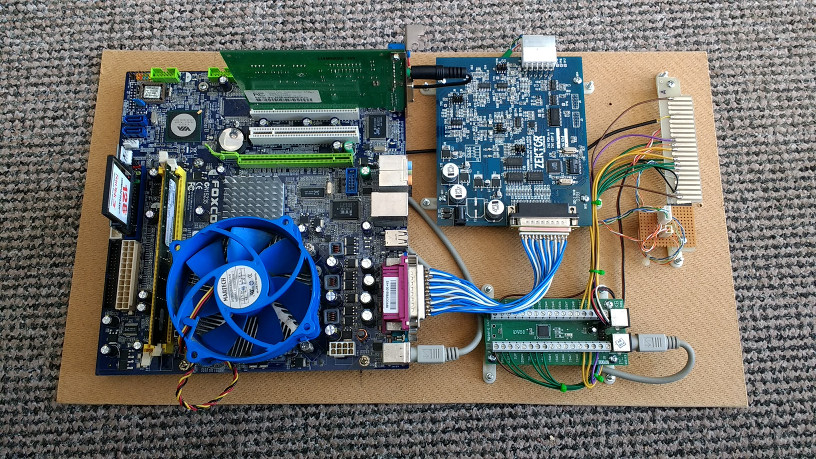
I mount as much as I can on a piece of hardboard the same size as the game PCB, then you can slot it in the cab without making any mods. Wire up an edge connector to break out the signals you want and you just need to plug in and go.

ZVG_Slot-in_Board-small.jpg


This one slots into my Asteroids cab. Ignore the piece of verboard by the edge connector, I originally made a ZVG cable for a Vectrex and re-purposed it for the cab, so made a small adapter board.
 

petercasino

Active member
vacBacker
Feedback
8 (100%)
Credits
193CR
chadsarcade said:
petercasino said:
It's a shame it's so difficult to find motherboards that are compatible with ZVG (in DOS) and are performant. I had a motherboard that worked really well but unfortunately it died. I eventually found another one that works but the performance isn't as good. Any recommendations of motherboards that work well?

The performance bottlenecks are probably with the parallel port/ZVG board rather than the emulation.

I've found most motherboards I've tried work OK, provided they have a PCI slot you should be able to get a soundcard working OK (I use a CT4810 sound blaster). I disable any on board peripherals in the BIOS that I don't need (Network, soundcard, extra SATA ports etc) to help free up resources.

If the BIOS doesn't have options to reserve or set IRQs then that can cause difficulties, as many devices may share IRQs and that can lead to problems. I have such a board, it's fine unless I add a USB spinner, then Mame stutters and crashes, USB clashes with the sound card IRQ I think. I use an IPAC for controls, but via a PS/2 connection.

I vaguely recall having issues with the keyboard LEDs on one board, not sure if that was down to using the IPAC via USB or now.

I've not tried anything as new as a UEFI board so can't speak for those.

What sort of issues have you found?

I mount as much as I can on a piece of hardboard the same size as the game PCB, then you can slot it in the cab without making any mods. Wire up an edge connector to break out the signals you want and you just need to plug in and go.

ZVG_Slot-in_Board-small.jpg


This one slots into my Asteroids cab. Ignore the piece of verboard by the edge connector, I originally made a ZVG cable for a Vectrex and re-purposed it for the cab, so made a small adapter board.

The issues I've found are in sourcing a motherboard that works with the sound card. I ended up buying 5 motherboards last time and I could only get the sound working with 1 of them! I don't know what motherboard features/lack of features allow the sound card to work when buying. I've been using a sound blaster 4780.

Any chance you could let me know the make/model/cpu of the motherboard in the picture?

I like the way you've mounted the components on hardboard, that's really neat, I'll give that a go myself.

Thanks
 

chadsarcade

Lord of Vectors (tm)
Feedback
11 (100%)
Credits
443CR
I've not had issues with the sound config after finally finding a card with drivers, you have to make sure the mobo doesn't allocate IRQ5 to it as the DOS SB emulation uses that. This is where the IRQ management in the BIOS comes in handy. I think there are also some ini or cfg files under the DOS SB drivers with values you can tweak.

I think I've successfully used a CT4780 as well (is that the SB Live?), that and the CT4810 have an on board amp which is nice, I feed the output of mine via the edge connector to the AR board and use the in-cab amp, speaker(s) and volume control. Works great except on Asteroids which is really distorted because of different component values on the AR board (you get the same distortion when running an Ast Dlx in an Asteroids cab).

The mobo above is a FoxConn N15235, however it's the one with the issues with the USB spinner. If I get a chance I'll dig out the model of the one in my other cab, it works with the spinner OK.

I've found the gfx card can be a speed bottleneck, MAME still seems to set a screenmode even if it doesn't draw to the VGA monitor. Setting a low res like 200 x 320 can speed up your ZVG games, but you need a card which supports low resolutions like this. Games like Tempest which are rotated run at half speed unless I set a low screen res.

If you use a piece of hardboard as above, make sure it's the same size as the PCB and you can slide it into the PCB rails. I only have to have the ATX PSU secured to the cab and connect up the mobo power, the rest is self contained.

Incidentally, where about in the NW are you?
 

petercasino

Active member
vacBacker
Feedback
8 (100%)
Credits
193CR
chadsarcade said:
I've not had issues with the sound config after finally finding a card with drivers, you have to make sure the mobo doesn't allocate IRQ5 to it as the DOS SB emulation uses that. This is where the IRQ management in the BIOS comes in handy. I think there are also some ini or cfg files under the DOS SB drivers with values you can tweak.

I think I've successfully used a CT4780 as well (is that the SB Live?), that and the CT4810 have an on board amp which is nice, I feed the output of mine via the edge connector to the AR board and use the in-cab amp, speaker(s) and volume control. Works great except on Asteroids which is really distorted because of different component values on the AR board (you get the same distortion when running an Ast Dlx in an Asteroids cab).

The mobo above is a FoxConn N15235, however it's the one with the issues with the USB spinner. If I get a chance I'll dig out the model of the one in my other cab, it works with the spinner OK.

I've found the gfx card can be a speed bottleneck, MAME still seems to set a screenmode even if it doesn't draw to the VGA monitor. Setting a low res like 200 x 320 can speed up your ZVG games, but you need a card which supports low resolutions like this. Games like Tempest which are rotated run at half speed unless I set a low screen res.

If you use a piece of hardboard as above, make sure it's the same size as the PCB and you can slide it into the PCB rails. I only have to have the ATX PSU secured to the cab and connect up the mobo power, the rest is self contained.

Incidentally, where about in the NW are you?

Yeah the CT4780 is an SB Live and it seems to work. I didn't think to use the AR board as an amplifier, I'm definitely going to do that now. I didn't realise that the GFX card affects it - definitely something else to tweak.

Thanks for letting me know the motherboard model, I think my spinner is connected via the ps2 mouse port so it should be ok. I can't remember the name of the spinner board I used.

I will give that motherboard a go, but if you get a chance to lookup the model of the other one that would be great.

I'm based in Wirral, where are you based?

petercasino2020-02-16 11:10:17
 

chadsarcade

Lord of Vectors (tm)
Feedback
11 (100%)
Credits
443CR
You should be fine with that mobo and a PS/2 spinner, I'd be interested to know what control board you use for it if you can find out some time. Not had a chance to pull out the other ZVG cab yet to check the mobo , I'll try through the week.

I'm between Wigan and Chorley so not a million miles from you, we've quite a contingent in the NW :)
 

chadsarcade

Lord of Vectors (tm)
Feedback
11 (100%)
Credits
443CR
Thanks for the info - looks like a nice little controller, if a little pricey. My Arduino solution comes in at about £20 including the spinner and knob.

Good luck with the mobo when it arrives, shout if you need any more details. I'll try and get that other model identified for you soon, it means lugging the cab out :)

Edit: Wonder of DOS would see this as a mouse device, with BIOS legacy support enabled: https://www.amazon.com/gp/product/B07NKJ3SKH/ref=ppx_yo_dt_b_asin_title_o00_s00?ie=UTF8&psc=1

chadsarcade2020-02-19 19:54:05
 

petercasino

Active member
vacBacker
Feedback
8 (100%)
Credits
193CR
chadsarcade said:
Edit: Wonder of DOS would see this as a mouse device, with BIOS legacy support enabled: https://www.amazon.com/gp/product/B07NKJ3SKH/ref=ppx_yo_dt_b_asin_title_o00_s00?ie=UTF8&psc=1

Worth a try at that price!

I installed the new motherboard this weekend. It's definitely an improvement in performance. However I still get slow down (in Black Widow for example) but it must be the parallel port to ZVG as you said. When I play the game on a normal monitor it's full speed with no slow down. I guess I need to try and reduce the resolution to 320x240? I wasn't able to do that with the onboard video. What graphics card have you been using to get the low resolution? I tried an ArcadeVGA card but it didn't work.
 

chadsarcade

Lord of Vectors (tm)
Feedback
11 (100%)
Credits
443CR
I'm just using the on board video on that mobo, but it's in my asteroids cab so I don't have black widow configured.

In my other cab with dual sticks I think I use a geforce of some description. Not had a chance to pull the cab out yet but I've a couple of days off at the end of the week so I'll get you the info then.

I recall speaking to DanP about the black widow slowdown, and apparently it's full speed on later levels. I ended up recompiling name and lowered the frame rate slightly which helped.
 

petercasino

Active member
vacBacker
Feedback
8 (100%)
Credits
193CR
chadsarcade said:
I'm just using the on board video on that mobo, but it's in my asteroids cab so I don't have black widow configured.

In my other cab with dual sticks I think I use a geforce of some description. Not had a chance to pull the cab out yet but I've a couple of days off at the end of the week so I'll get you the info then.

I recall speaking to DanP about the black widow slowdown, and apparently it's full speed on later levels. I ended up recompiling name and lowered the frame rate slightly which helped.

Did you manage to pull the cab out?
 

chadsarcade

Lord of Vectors (tm)
Feedback
11 (100%)
Credits
443CR
Yes, the video card is a Asus v8170 Pro (geforce clone)

The motherboard is by Dell and doesn't have a model that I can see. I kept half the case which it's mounted in but not the front badge unfortunately. I do have the tag number on the back but searching for this on Dell's site doesn't bring back any hits (J0HPC0J if you want to try)
 

Equites

Chief Sheesher®
vacBacker
Feedback
35 (100%)
Credits
3,318CR
chadsarcade said:
Yes, the video card is a Asus v8170 Pro (geforce clone)

The motherboard is by Dell and doesn't have a model that I can see. I kept half the case which it's mounted in but not the front badge unfortunately. I do have the tag number on the back but searching for this on Dell's site doesn't bring back any hits (J0HPC0J if you want to try)

If you can boot windows you can run CPU-Z which will give you the mobo model details.
 
Top