

ArcadeDave
Newbie
Hi all,
Hoping someone with more Chihiro experience than me might be able to point me in the right direction with an OutRun 2 twin I’m working on.
I’ve got two Chihiro setups. They’re running without the original GD-ROM drive, using these small GD replacement/flash boards.
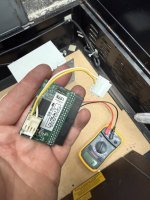
One side works fine, but the other consistently comes up with:
ERROR 25 – CANNOT ACCESS GD-ROM DRIVE
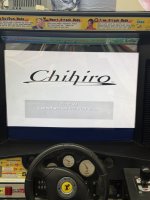
Going into the Media Board Test on the faulty one gives:
DIMM BOARD (TYPE 3)
VERSION 1.12
STATUS: BAD
DIMM0: GOOD
DIMM1: NONE
GD-ROM: BAD
I’ve been trying to narrow it down by swapping known-good parts between the two machines.
So far I’ve tried:
I’ve had a close look around the 40-pin GD connector and can’t see any obviously bent pins, burnt components, etc. I’ve also done some basic continuity comparisons against the working board and haven’t found anything obviously different yet.
Before I start disappearing down the board-repair rabbit hole, is there anything silly I’m overlooking? DIP switches, jumpers, DIMM firmware, configuration, BIOS/version compatibility, etc.? The faulty board reports DIMM firmware 1.12; I haven’t yet checked what version the working one reports, so that’s on my list.
One big pain is that I currently only have one suitable power supply 🤦♂️ , so I can’t have both Chihiros powered up side-by-side. That’s making direct voltage/signal comparisons a bit more awkward - I’m having to swap things around and test them one at a time
Has anyone encountered Error 25 / GD-ROM BAD where the fault definitely follows the Chihiro/media board, particularly when using one of these GD replacement boards?
Any obvious settings, known failure points or tests I’ve missed would be very much appreciated as I’m totally green on this hardware.
Cheers!
Hoping someone with more Chihiro experience than me might be able to point me in the right direction with an OutRun 2 twin I’m working on.
I’ve got two Chihiro setups. They’re running without the original GD-ROM drive, using these small GD replacement/flash boards.
One side works fine, but the other consistently comes up with:
ERROR 25 – CANNOT ACCESS GD-ROM DRIVE
Going into the Media Board Test on the faulty one gives:
DIMM BOARD (TYPE 3)
VERSION 1.12
STATUS: BAD
DIMM0: GOOD
DIMM1: NONE
GD-ROM: BAD
I’ve been trying to narrow it down by swapping known-good parts between the two machines.
So far I’ve tried:
- Swapped the small GD replacement boards between machines - fault remains with the same Chihiro
- Swapped the associated cable - same result
- DIMM RAM test reports GOOD
- Swapped the complete main Chihiro/media board assembly from the working machine into the faulty side - faulty side then works
- Put the suspect main board into the previously working side - Error 25 follows the board
I’ve had a close look around the 40-pin GD connector and can’t see any obviously bent pins, burnt components, etc. I’ve also done some basic continuity comparisons against the working board and haven’t found anything obviously different yet.
Before I start disappearing down the board-repair rabbit hole, is there anything silly I’m overlooking? DIP switches, jumpers, DIMM firmware, configuration, BIOS/version compatibility, etc.? The faulty board reports DIMM firmware 1.12; I haven’t yet checked what version the working one reports, so that’s on my list.
One big pain is that I currently only have one suitable power supply 🤦♂️ , so I can’t have both Chihiros powered up side-by-side. That’s making direct voltage/signal comparisons a bit more awkward - I’m having to swap things around and test them one at a time
Has anyone encountered Error 25 / GD-ROM BAD where the fault definitely follows the Chihiro/media board, particularly when using one of these GD replacement boards?
Any obvious settings, known failure points or tests I’ve missed would be very much appreciated as I’m totally green on this hardware.
Cheers!