

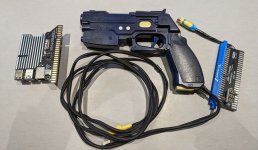
I picked up another RGB-Pi Jamma adaptor recently and had a spare GunCon 2 lying around from when I was testing support in Windows (didn't work too well!) so thought I'd try out their GunCon 2 support in the new OS4 image. The setup is pretty straightforward, you just need to wire up the yellow video plug to the video sync and ground on the jamma loom. I bought a plug through adaptor from @qjuk (which is great quality by the way) and soldered a female plug onto the video sync and ground and ran them to the side of the adaptor. Then you just plug the USB and video cable in and away you go. It works surprisingly well, there is a calibration on the main menu that includes a colour bar, the sensor in the gun doesn't react on black so you need to pump up the brightness and keep testing until it works, this is the only downside really, one other thing to note is that it won't work if there is glass between the gun and the CRT screen. Once calibrated you can launch the games from a separate sub section on the usual roms screen, they then launch with a custom config file that includes the GunCon as the controller and they have altered the gamma settings in the game to pump up the blacks to greys so the gun and game respond correctly. Support for more games is being added over time and you can play the Dreamcast versions of HOTD2 and Virtua Cop 2 which play at full speed with the overclock enabled. There is a bunch of mame games like Op Wolf and Playstation games like Time Crisis and Point Blank, all tested fine. You can also play Naomi shooters but only at 31Khz so if you have a trisync monitor it would work well, I only tested 15Khz.
A bit of HOTD2 gameplay, you'll see that the lighting in my garage is terrible and caused me some issues, I couldn't get to the back of the cab to up the brightness either! Op Wolf played perfectly
A bit of HOTD2 gameplay, you'll see that the lighting in my garage is terrible and caused me some issues, I couldn't get to the back of the cab to up the brightness either! Op Wolf played perfectly
