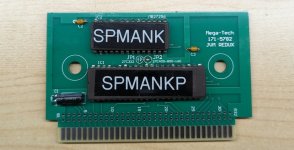
Open source Sega Mega-Tech reproduction game carts

mourix

User
Credits
307CR
During my restoration I found game prices for this machine had skyrocketed and ended up reverse engineering original carts to make my own cheaper copies.
Because sharing is caring: I've open sourced the designs for everyone here!

There are two most common carts for the Mega-Tech:
  1. 171-5782 - 4 Megabit Mega Drive based games
  2. 171-5783 - 1 or 2 megabit Master System based games
1711310264552.png

For both designs I have made two versions:
  1. A 1:1 carbon copy "repro" version, which is the result of my reverse engineering.
  2. An optimized "redux" version, which removes unused parts and adds features to make homebrew carts easier.
I invite everyone to make their own :)
 
Last edited:

mourix

User
Credits
307CR
How to assemble the Redux PCBs :)

2024-04-02 19.09.25.jpg

To assemble a single cart you need:
  • 1pc Japanese Mega Drive shell.
  • 1pc Redux PCB:
    • 171-5782 for Mega Drive based games.
    • 171-5783 for Master System based games.
  • 1pc 47uF 16V electrolytic capacitor.
  • 2pcs 22nF ceramic/MLCC capacitors.
  • 1pc Menu EPROM - 27C256.
  • 1pc Game EPROM:
    • For Mega Drive:
      • 27C400 - 512KBs (4Mbits)
      • 27C800 - 1MBs (8Mbits)
      • 27C160 - 2MBs (16Mbits)
      • 27C322 - 4MBs (32Mbits)
    • For Master System:
      • Remove the ROM from an original Master System cart as they contain logic.

Let's make a Spider-Man vs. The Kingpin cart (4Mbit Mega-Drive based)

First, order the PCBs on JLCPCB. You upload the 171-5782_Redux_Gerber.zip file and put in the following settings:

Screenshot 2024-04-03 121518.png

Next up is programming the EPROMs.
I used a Xgecu T48 Programmer. It can program 27C256 directly but needs a 16-bit adapter for the game ROMs. A label printer is handy too.

2024-03-28 16.27.23.jpg

Unzip your *legally* dumped ROMs, with the 32kb ROM always being the menu one:

Screenshot 2024-03-28 161957.png

Now, burn both of them.
The 27C256 is mandatory for the menu ROM, but you can use a larger EPROMS for the game ROM. I used a 16Mbit 27c160 for this 4Mbit game.

Screenshot 2024-03-28 162508.pngScreenshot 2024-03-28 163152.png

Note: the quality of EPROMs I got off Aliexpress has been really hit and miss. You can ignore a check ID error, but be sure the flash finishes like this:

screenshot-2024-03-28-163213-png.18384
 

Attachments

  • Screenshot 2024-03-28 163213.png
    Screenshot 2024-03-28 163213.png
    23.8 KB · Views: 162
Last edited:

mourix

User
Credits
307CR
Finally, soldering time (don't forget the solder jumper!):

2024-04-02 19.16.54.jpg

And enjoy your game:

2024-04-02 19.22.39.jpg

To finish things off, put it in a shell:

2024-04-02 19.19.41.jpg

And maybe use that label printer to mark the shell:

2024-04-02 19.20.51.jpg
 

mourix

User
Credits
307CR
What about the Master System based carts?
  • Same JLCPCB settings as before, but order the 171-5783_Redux_Gerber.zip this time.
  • Burn the 27C256 menu EPROM.
  • Desolder the game Sega ROM from a real Sega Master System cart.
  • Solder everything to the new PCB, noting the solder jumper for 1M ROMs.
2024-03-23 23.15.06.png
 
Last edited:

Adamski

Active member
Feedback
7 (100%)
Credits
337CR
Where do I get parts?
Good job,jolly good effort you put into this.Out of curiosity too,how easy is it to repurpose a megatech cart (ice hockey or basketball) to a more exciting title?
 

mourix

User
Credits
307CR
Where do I get parts?
Good job,jolly good effort you put into this.Out of curiosity too,how easy is it to repurpose a megatech cart (ice hockey or basketball) to a more exciting title?
There is an old tutorial here, but even the value of Basketball/Hockey is much higher than the the cost of one repro above, not even counting the desoldering efforts.
 

mourix

User
Credits
307CR
2024-04-23 00.11.17.jpg

For the Mega-Tech Mega Drive Converter you need:
  • 1pc Mega Drive Converter PCB.
  • 1pc 47uF 16V electrolytic capacitor.
  • 1pc 22nF ceramic/MLCC capacitor.
  • 1pc Menu EPROM - 27C256.
  • 1pc "2x32P 2.54mm pitch edge connector" or "Mega Drive cartridge connector".
Besides of the PCB, all of these parts are available from Aliexpress.
 
Last edited:

akiraakira29

Newbie
Credits
3CR
View attachment 19382

For the Mega-Tech Mega Drive Converter you need:
  • 1pc Mega Drive Converter PCB.
  • 1pc 47uF 16V electrolytic capacitor.
  • 1pc 22nF ceramic/MLCC capacitor.
  • 1pc Menu EPROM - 27C256.
  • 1pc "2x32P 2.54mm pitch edge connector" or "Mega Drive cartridge connector".
Besides of the PCB, all of these parts are available from Aliexpress
View attachment 19382

For the Mega-Tech Mega Drive Converter you need:
  • 1pc Mega Drive Converter PCB.
  • 1pc 47uF 16V electrolytic capacitor.
  • 1pc 22nF ceramic/MLCC capacitor.
  • 1pc Menu EPROM - 27C256.
  • 1pc "2x32P 2.54mm pitch edge connector" or "Mega Drive cartridge connector".
Besides of the PCB, all of these parts are available from Aliexpress.
Hello, does the 27c256 eprom have to be programmed with a file? If so, is this the "mt-menu_maker.py" file? Thanks
 
Last edited:

Fantazia2

Active member
vacBacker
Feedback
13 (100%)
Credits
2,170CR
Hello, does the 27c256 eprom have to be programmed with a file? If so, is this the "mt-menu_maker.py" file? Thanks

I would assume you will need to run the python script to create the file that then gets written to the EPROM

It pulls settings from the config.ini to say what is set in the menu rom file.

Or if you look through the guide it tells you that the menu rom to burn to the 27C256 is in the zip file for the "legally" acquired rom, if you dont want to create a custom one using the python script.
 
Top