Galaxian bootleg shorting

Retroman839

Senior Member
vacBacker
Feedback
12 (100%)
Credits
7,197CR
RGB:
  • Pin 13 (Red Ground)
  • Pin 17 (Green Ground)
  • Pin 18 (Blue Ground)
  • Pin 14 (General/Analog Ground)
Looks like pin 14 is your vid ground on the scart …

You could check continuity from this pin 14 on the scart out of the super gun - to your vid ground of your galaxian v ground .
 

Retroman839

Senior Member
vacBacker
Feedback
12 (100%)
Credits
7,197CR
Yeh You are most likely correct.
I was thinking of when I to
Paired a chasiss to a tube .
And I had erratic sync .

I might be wrong but I seem to remeber linking vid ground to sync .. i can check when home I still have it set up .

I was going to mention as well but didn’t think it was worth it because he has sync although its erratic ..

The "handshake" voltage in an
RGBS (Red, Green, Blue, Sync) video signal typically refers to the voltage level of the synchronization (sync) signal, which can be either a TTL (Transistor-Transistor Logic) level of 5V or a lower 75-ohm video level of approximately 0.3V to 0.7V. The specific voltage depends on the equipment and standard being used.

Could the short that you had
Have caused an issue with your low level sync voltage circuit on the pcb ?


Looks like H&V is screwy
 
Last edited:

Judder

Active member
Feedback
2 (100%)
Credits
992CR
So to answer the Video GND question, the Video GND pin on the Galaxian PCB is actually directly connected to both of the GNDs at 1/A, 2/B and 21/Y, 22/Z so even though I have 14 on the JAMMA side connected directly to the JAMMA GND, it actually electronically makes no difference as they are all part of the same circuit together.

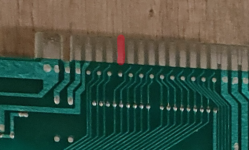
I think having 14 connected to GND is key, but it definitely is if you look at the photo of the whole setup together below.

What I am going to do later with the SYNC is compare it with another working JAMMA board and see what the signal of P (JAMMA Video SYNC) looks like vs. the Galaxian one - at least that way I can do a like for like comparison (y)

GalaxianSuperGunSetup.jpg

and that same pin on the bottom isn't connected at all, so no need for the extra bottom GND I had added just in case :)

Screenshot 2025-12-08 at 17.05.16.png
 

Judder

Active member
Feedback
2 (100%)
Credits
992CR
Positive Update: Galaxian is alive :cool:

GalaxianIsAlive.jpg

So I tried adding GND to the Video SYNC just by connecting a GND wire in, and basically it flattened the SYNC signal to 0 when monitoring through my digital oscilloscope, the TV screen flickered but nothing positive happened, so I then discounted that idea

Next I decided to plug in a working JAMMA board to view the SYNC on that through my test scope, and connecting that all up, the screen booted to a very grey screen and I can only just make out the Insert Coin writing, when I'm sure this used to be a working board?!

So I went digging through the cupboard and found a replacement SCART cable and decided to try connecting that to the TV instead of the one I was using, and Bingo we get a full picture back on the JAMMA test board and the Super Gun and TV setup

So.. I then wondered if now that we had a picture with a known working board, whether this setup would now look differently on our Galaxian boot board...

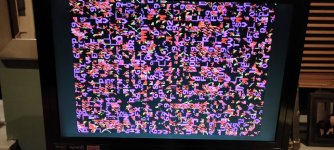
So connected it all up, new SCART cable connected and ta-da - we now have a working picture from the board! :)

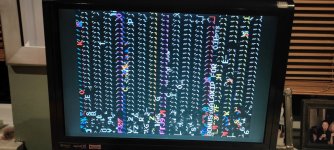
The display is junk, which is fine, but the CPU is running as their is activity on the screen, so now to go and burn the test ROM and see where we get to with that

The colours look wrong at this point, but hey, at least we are up and running and can debug from here (y)


Judder

Active member
Feedback
2 (100%)
Credits
992CR
Next thing is to check the reset on pin 26 of the Z80.

Yep, good shout - that's continually resetting as it is switching constantly between high and low, even with just the test ROM burnt on to a 2716 and connected in socket 7F

Where to go looking next I wonder?

Phil did a nice Fixlog where he checked the two 74367 buffers at 7D & 7E, and the 74138 decoder at 8N that generates the watchdog reset for stuck outputs next so it sounds like that's the next areas for me to go and check too

I checked the +5V on the Z80 and that is all good, and the address lines have activity and testing the test ROM at 7F that is pulsing between off and high I would guess to match the frequency of the watchdog reset so the board is trying to run as far as I can tell
 

Judder

Active member
Feedback
2 (100%)
Credits
992CR
What socket did you use for the test rom? That board has an weird roms arrangement.

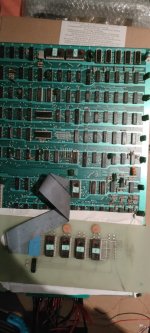
Yes that also is a very valid point because just looking at the board to photograph it, the test ROM is _actually_ in socket 7J _not_ 7F because 7F has no socket, and only a small radial capacitor there which is definitely unusual!

I might need to ping @philmurr to get his thoughts as he knows the memory maps of Galaxian much better so would know if this approach will work or not!

GalaxianBootletWithTestROM.jpg
 

philmurr

Active member
vacBacker
Feedback
46 (100%)
Credits
2,310CR
In a "normal" Galaxian board you need to use a 2532 on the main board for the test ROM (and put it into the position where you don't have a socket fitted!). I've not seen one without that socket populated so trying a 2532 in one of the other 2 sockets should work.

But if you are using a 2716 then you should be able to use the daughterboard and replace one of the ROMs on that. I've not seen that daughterboard before so it would just be guesswork as to what socket to use
 

Judder

Active member
Feedback
2 (100%)
Credits
992CR
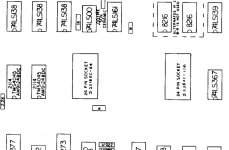
and one other thing I'd noticed regarding the ROMs and their positions, is that Galaxian Operator's Manual specifies 7F as being a 2316 and 7L as a 2364 so I wonder if we can replace the daughter board of the 4 x 2716s with one 2764 just with the 4 images stacked in position 7L?

Weirdly this board has the daughter board at 7J (4 x 2716) and a 2716 at 7L

Galaxian Operator's Manual

Screenshot 2025-12-09 at 16.13.35.png
 

Georgian2

Active member
Feedback
12 (100%)
Credits
1,767CR
In a "normal" Galaxian board you need to use a 2532 on the main board for the test ROM (and put it into the position where you don't have a socket fitted!). I've not seen one without that socket populated so trying a 2532 in one of the other 2 sockets should work.

But if you are using a 2716 then you should be able to use the daughterboard and replace one of the ROMs on that. I've not seen that daughterboard before so it would just be guesswork as to what socket to use
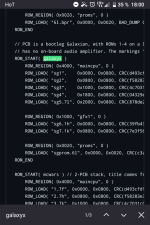
An 2716 instead of SG1 would be my guess here. Its the lowest rom in rom space.
https://github.com/mamedev/mame/blob/master/src/mame/galaxian/galaxian.cpp

Screenshot_20251209-180030.png
 

Judder

Active member
Feedback
2 (100%)
Credits
992CR
No luck with the test ROM on any of the sockets across the board using either a 2716 or a 2732, so I switched back to the original ROMS and monitored the Watchdog for a while and it every now and then stopped barking and was trying to run some code (y)

So I left it go for a while and watched and finally it ran enough code to show some of the program, and it looks like it is a Spanish Galaxian bootleg called Galaxip!

IMG20251209190019.jpg

Galaxip has different colours and blue aliens, so that's maybe why the output looks different and when I was initially reading the ROMs against ROMident, some of the legs had snapped so I mounted them in sockets and the code dumps couldn't be identified so I guess there must be some problems with the original ROMs and consistently reading the code from them

Next step tomorrow is to burn a new complete set of the Namco ROM code and colour ROMs on to nice new fresh 2716s, install these, and then see if we can get this board to come back to life :cool:🤞
 

Retroman839

Senior Member
vacBacker
Feedback
12 (100%)
Credits
7,197CR
No luck with the test ROM on any of the sockets across the board using either a 2716 or a 2732, so I switched back to the original ROMS and monitored the Watchdog for a while and it every now and then stopped barking and was trying to run some code (y)

So I left it go for a while and watched and finally it ran enough code to show some of the program, and it looks like it is a Spanish Galaxian bootleg called Galaxip!

View attachment 49509

Galaxip has different colours and blue aliens, so that's maybe why the output looks different and when I was initially reading the ROMs against ROMident, some of the legs had snapped so I mounted them in sockets and the code dumps couldn't be identified so I guess there must be some problems with the original ROMs and consistently reading the code from them

Next step tomorrow is to burn a new complete set of the Namco ROM code and colour ROMs on to nice new fresh 2716s, install these, and then see if we can get this board to come back to life :cool:🤞
Good luck ..
Wouldn’t boot leg rooms have more chance of being compatible ?
 

Georgian2

Active member
Feedback
12 (100%)
Credits
1,767CR
No luck with the test ROM on any of the sockets across the board using either a 2716 or a 2732, so I switched back to the original ROMS and monitored the Watchdog for a while and it every now and then stopped barking and was trying to run some code (y)

So I left it go for a while and watched and finally it ran enough code to show some of the program, and it looks like it is a Spanish Galaxian bootleg called Galaxip!

View attachment 49509

Galaxip has different colours and blue aliens, so that's maybe why the output looks different and when I was initially reading the ROMs against ROMident, some of the legs had snapped so I mounted them in sockets and the code dumps couldn't be identified so I guess there must be some problems with the original ROMs and consistently reading the code from them

Next step tomorrow is to burn a new complete set of the Namco ROM code and colour ROMs on to nice new fresh 2716s, install these, and then see if we can get this board to come back to life :cool:🤞
It looks like that romset has fewer roms than yours. Yours is most likely galaxyx. Did you do an romident on the eproms?
 

Judder

Active member
Feedback
2 (100%)
Credits
992CR
It looks like that romset has fewer roms than yours. Yours is most likely galaxyx. Did you do an romident on the eproms?

Thanks 👍

Yes, I did, but as ROM SG1 and ROM SG4 both had one or two snapped legs, they would never give a solid read or match with Romident even with a socket shim to connect the broken legs

SG2, SG3 and SG5 both turned up as matching many other types of Galaxian ROM so it was hard to work out what set this was.

So my basic thinking is that we need a 5 ROM x 2716 version of the code which I was hedging my bets on would be the Midway / Namco version of the code

Hence the plan tomorrow to try all new ROM burns and hopefully the new chips will be solid reads and enable the board to boot 🤞
 

Judder

Active member
Feedback
2 (100%)
Credits
992CR
Update:

I was hoping for a quick win today with a new fresh set of Midway ROMs burnt but unluckily not so easy :/

Even with these installed the board is still pulsing the Watchdog reset, so I think the issue is either with the ROM daughter board (most likely) or the reset circuit

New set of Midway ROMs ready to go:

IMG20251210180937.jpg

Installed in the board but the board is still bouncing the Z80 reset pin via the Watchdog circuit:

IMG20251210193155.jpg

So I think my next approach is to try metering out all of the daughter board connections to see if any are broken

Or, if anyone has a better looking spare daughter board they would be willing to let go I'd be very interested in getting hold of that and trying it out as the sockets on this one look pretty flimsy!

Thanks, Alex
 
Top