Galaxian bootleg shorting

Judder

Active member
Feedback
2 (100%)
Credits
992CR
Update:

So as the Watchdog was continuously barking and resetting the Z80 CPU I decided the next best step would be to disable this and see what happens when the machine does try and boot.

On the Galaxian schematic there is a jumper that can be bridged that pulls the watchdog reset circuit to GND and disables the Watchdog from resetting the Z80 CPU, however on my board the jumper is there, but it is covered over with conformal coating (*new word to me!) so I decided to do this a different way.

Screenshot 2025-12-15 at 18.37.14.png

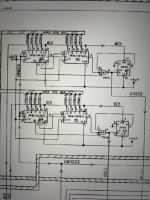
If you look at the schematic there is a pull-up resistor at R53 that is acting to pull pin 10 of the 7400 at 8L high so if we connect the jumper side of that to GND it acts as the same thing.

GroundingTheWatchdog.jpg

With the Watchdog disabled the board now boots to a solid screen of 0s which according to this thread over at Aussie Arcade is potentially saying points to bad 2114 RAM chips at P7 or N7 (or both)
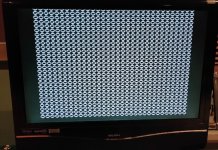
DisplayWithWatchdogDisabled.jpg

So I have ordered some new 2148 RAM chips as these run cooler and are pin compatible from a post that Michell Gant wrote here so will try those when they arrive and see where we get to

I also found this in my stash of arcade manuals which is super handy and super cool


GalaxianParts&OpertingManual.jpg

GalaxianSchematic.jpg

Any other thoughts always welcome :)
 

Judder

Active member
Feedback
2 (100%)
Credits
992CR
Thanks and no, still no success with the Test ROM but with the Test ROM in 7J that is how I get the board to boot to the screen of 0s so that feels like the correct position for it and that it is reading code from it, just not running it or storing it effectively.

I have a daughter board coming from Phil M which should let me do some more tests, and I'm now away from the board until the New Year so will try testing some of the RAM chips I have from the board in the meantime - time to revive another 1/2 finished project Colin and I were working on a few years ago now...

Arduino RAM tester
 

Judder

Active member
Feedback
2 (100%)
Credits
992CR
Progress!

I got in touch with Phil Murray and asked if he had any of his Galaxian daughterboards for sale, and he did, so I order a couple and then have spent the last few weeks on and off slowly building one of those and programming the GAL and the EPROM and soldering in all of the connectors - makes you realise how reasonable Phil's prebuilt ones are when you buy one from him!

So then managed to very carefully remove the Z80 CPU from the board and transfer this over to the new PM daughterboard, and here I hit my first snag...

The 40 pin sockets I used were Round Holder Sockets, which look lovely but are _very_ difficult to align up 40 legs of an already shaped Z80 chip in to without catching one of the legs of the edge and bending it or having to try for the xth amount of time to reseat it again and bend the legs a tiny bit more in than before etc.

Next time I'll just go for the normal type of sockets, but anyway in the end I managed to seat the Z80 CPU into the socket, connectivity tested every pin of the Z80 to the matching pad on the bottom of the PM daughterboard, and then tested the same continuity for the GAL, EPROM and all the other chips - all luckily were good :)

So with the CPU removed from the board I then went to mount my new shiny PM daughterboard on to the board and hit my SECOND snag, in that the bootleg board uses very strange sockets that have tiny tiny pin openings on them, so the 1x40 Single Row Male 2.54 Breakable Pin Header Connectors I had used for the bottom of the PM daughterboard were _way_ too big to fit in these holes so I tried mounting another 40 pin round holed socket on top, and then the daughterboard to that but the pin header connectors wouldn't fit in to that either - damn

So I went to remove the 40 pin round holed socket from the board, and managed to lift the top 'mask' of the socket off of the board socket, and actually managed to expose quite nicely the spring loaded 40 pin sockets underneath which _looked_ like I could then connect the PM daughterboard straight to these

Very carefully easing the PM daughterboard in place I managed to get it to click in to the Galaxian board CPU socket and hit the power on button on the JAMMA adapter...

LIFE!

BAD RAM 1

This is great because we now know that the CPU is running, the game ROMS on the PM daughterboard are working and the video circuit is intact.

Now to investigate why I am getting a BAD RAM 1 response when I have checked all of the 2114 RAMs already with a handy memory tester I bought off of eBay :) :)

Picture 1: PM daughterboard installed and socket 'mask' and round holed sockets visible at the top of the photo

IMG20260115183727.jpg

Picture 2: We have life!

IMG20260115183736.jpg
 

Judder

Active member
Feedback
2 (100%)
Credits
992CR
IMG20260116223341.jpg

So I pulled the 2114 RAM chips on a spare moment today and indeed two legs on the only one I hadn't tested had completely disintegrated!

I put into a matching socket and ran it through my handy eBay 2114 memory tester which gave it the all clear so I then plugged it back in to the board, found a new working ATX power supply for my Super Gun as the one I have been using decided to give up the ghost and lo and behold...

Galaxians, Stars, Colours and pictures - I think we are almost there :)
 

philmurr

Active member
vacBacker
Feedback
46 (100%)
Credits
2,316CR
Top work Alex!

To reset the high scores hold fire on power-up until attract mode starts. And for freeplay (maintaining attract mode) set the coinage DIPs to freeplay as usual
 

Judder

Active member
Feedback
2 (100%)
Credits
992CR
Top work Alex!

To reset the high scores hold fire on power-up until attract mode starts. And for freeplay (maintaining attract mode) set the coinage DIPs to freeplay as usual
Thanks Phil!

Yes I'm super chuffed to have got the board working and I spent the later afternoon wiring up the player controls, coin up and start button inputs to my JAMMA convertor to start testing the game for real

...and I encountered my first new problem :)

When the Galaxian ships fire, the bullets appear on the screen but they are higher up than the Galaxians are and then disappear as they get half way down the screen

Interestingly the bullets still kill you at the point they would if they were being drawn correctly, it just seems the rendering of the bullets is being offset by something

I'm thinking it is probably the 27LS00 Sprite / Attack RAM so plan to try swapping some of those chips around and see what I get and also send off the Gerber files for Macro's Sprite RAM replacement board to a PCB with the aim to switch that in long term

It might also be the TTLs that control these RAM chips but hopefully moving the RAM chips around will show if the problem stays regardless of which RAM chips is where or whether it follows a particular RAM chip 👍
 

Judder

Active member
Feedback
2 (100%)
Credits
992CR
Here's a quick video showing the bullets being out of alignment with the swooping Galaxians


I tried piggy backing a new 74LS74 on to 5P, but it didn't affect the behaviour so either that approach isn't valid or that chip isn't the problem here

You can see the four 74161 chips in this shot at 5R, 5S, 4R and 4S in this shot as well as the piggy backed 74LS74 at 5P so I think next step is to order some new 74161 chips and try those out in replacement of the existing ones...

GalaxianBulletCounters.jpg
 
Last edited:

Judder

Active member
Feedback
2 (100%)
Credits
992CR
Fixed!

So I studied the schematics a little more and read up on the difference between 'Missiles', which are the bullets you fire at the alien ships, and 'Shells', which are the bullets that the alien ships drop at you, and my issues is with the 'Shells' part of the circuit as it is the alien bullets being fired at your ship that are out of position

Luckily the Galaxian schematic is labelled nicely with which part of the circuit does what for both of these, so if we look at the bullet counter section of the schematic we can see that it is the two 74161 chips at 5S and 4S that are providing the Shells part of the counter circuit


ShellsAndMissilesCounterSchematic.jpg

Taking one of my newly purchase 74161 chips I opted to start with piggybacking it on top of the existing chip at 5S, powered on the board and amazingly now we have the 'Shells' back in line with the attacking alien ships 👍

74161-5S-PiggyBacked.jpg

Next step is to get a logic chip on the existing 5S chip and see which pin is stuck high or low, and then remove and replace the chip with a socket and new chip, but at least we have a fully working board to get on and work with 👍

Quick video:


Next on the list is to add in the missing audio amplified circuitry following a handy guide I found over at Aussie Arcade :)
 
Top