Help with 486

Retroman839

Senior Member
vacBacker
Feedback
12 (100%)
Credits
7,183CR
I have screwed my sound card settings ..
Need help with dos if anyone knows …
I want to rename my backup files & delete current screwd up files …

Só I think first

Ren config.sys c.sys
Ren Autoexe.bat a.bat

Because conflicts with new renamed back up files wouls occur if I did not do this first .


Ren config.bak config.sys
Ren Autoexe.bak Autoexe.bat

Then I need to delete c.sys & a.bat ? Not sure how to delete

Unless it’s
C:\ c.sys delete

Does the above sound ok ?
Any help appreciated
 

Retroman839

Senior Member
vacBacker
Feedback
12 (100%)
Credits
7,183CR
Thanks sparky
Yeh I’m sure I’m not making sense,
I don’t know how to do this.

All is ok except sb16 not set
Just trying to get sound back working again .
 

Spanky

Active member
Feedback
2 (100%)
Credits
575CR
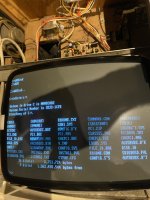
Right. Do a quick DIR /W C:\ please, just to see what you've got.

Do you want or need to keep the current C:\CONFIG.SYS and C:\AUTOEXEC.BAT ?
 

Retroman839

Senior Member
vacBacker
Feedback
12 (100%)
Credits
7,183CR
I am not entirely sure my back up is correct I’m assuming if the
Config file was ok
Which it was the it was an exact copy that it saved ..

Same for Autoexe.bat
 

Spanky

Active member
Feedback
2 (100%)
Credits
575CR
Are you saying you reckon the current C:\CONFIG.SYS and C:\AUTOEXEC.BAT are screwed?

I can't see copies (backups) of them. Unless they're in a subdirectory.
 

mlynn

User
Credits
121CR
You can have as many backups as you want:
copy autoexec.bat auto1.bat
copy config.sys config1.sys
etc.


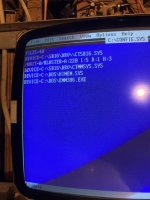
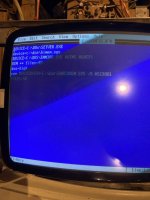
The settings you will need to change for a SoundBlaster card are in autoexec.bat:
e.g. SET BLASTER=A220 I5 D1 H5 P330 T5

Where A= Port number; I = Interrupt number; D = DMA channel used (8 bits); H = High DMA channel used (16 bits); P= Midi Port (MPU) and T = Type of card.
IIRC these are dependent on whether it is an ISA or PCI card.
 

mlynn

User
Credits
121CR
Every time the text editor saves a file it writes a .bak file for the file being edited so it's the last edit which might have overwritten a change you want to keep.
It is much safer to manage the backups yourself by copying the good file to a numbered backup.

Check the contents of the file using the command "more config.bak" to see what's in it.
 
Top