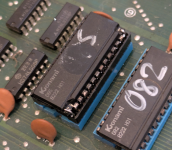
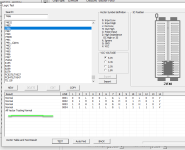
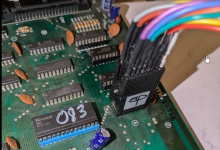
Next project... Konami... Tutankham...

NivagSwerdna

Active member
Feedback
1 (100%)
Credits
744CR
I have the attached schematic from previous work which gives a bit of an idea... This isn't from a Tut and looks a bit incomplete but it might be enough to have a crack at it...

pin 11 is nRD (I'm not sure Tut actually uses this)
pin 15 is nWR
pin 13 is FLIP
pin 10 is SCROLL ACTIVE
pins 1-8 are the data-bus for loading/reading the scroll value
pins 20-27 are the video counter in and scroll value out bus
pin 9 and pin 16 are enables? so only part of the screen scrolls
pin 17 and pin 18... no idea!
pin 12... also no idea!

1742505434841.png
 

Attachments

  • RSTU_K085_v1_0.pdf
    121.2 KB · Views: 4
Last edited:

NivagSwerdna

Active member
Feedback
1 (100%)
Credits
744CR
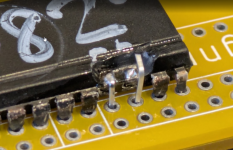
Had to Dremel off the corners to get decent contact on the completely gone pins; scraped the other pins with a craft knife... But of course I don't know if it was working anyway.

1742745087041.png
 

NivagSwerdna

Active member
Feedback
1 (100%)
Credits
744CR
So I tested the 085 a bit in my chip wrangler and I think it is good so it can go back in the board for a bit...

1743179575328.png

Also found my Tut Diagnostic ROM...
But...
Screenshot 2025-03-28 16-29-39.png

Logic Probe has activity on LIC and nRESET HI so the processor is probably doing something.

I suspect the 083 but I don't have a spare one to test which is really annoying and the one on my other Tut board is soldered in and I'm tempted not to unsolder it.

A long time back I bought a couple of Konami customs to play with but for the life of me I cannot remember where I put them of even if I had an 083...
 

NivagSwerdna

Active member
Feedback
1 (100%)
Credits
744CR
Had a quick test and scrape of the pins of the K083 and I think it works as expected... Definitely looks like video addressing is the issue.. will look at the signals on D11 and F11 and see if we have sensible video counters...

1743182987805.png

F11 p11 always LOW... should be same as p13 which is 766kHz; Outputs of D11 look fine.
Job for the weekend... replace F11 and Socket the CPU.
 
Last edited:

NivagSwerdna

Active member
Feedback
1 (100%)
Credits
744CR
Are we there yet? Clearly not.

Screenshot 2025-03-29 11-36-18.png

I had a peak at all four of the 74LS153s and seem OK although some of the signals from the Konami 085 look a bit strange but given I don't understand exactly what they should look like... the video address gets latched into the K85 every line and then the adjusted address goes out on the next line so the values change twice per line so it's all a bit confusing.
Decided to change tack given that we have a nice picture albeit it with the wrong pixel colours everywhere... So working backwards a bit from the video output gets me to the video palette RAM or more specifically how the colour is selected...

1743248472581.png

So looking at A5... the inputs pins 3, 13, 6 and 10 are the pixel colour... which then goes to the palette RAM at A3 and A4. When the colour palette is being written the A5 allows the colour address to pass through but most of the time A3 and A4 are just read and emit a colour value.

Logic on A5 shows... (pins are numbered 1-16 but channels here 0-15)... so colour bit on pin 6 (CH5) should go out on pin 7 (CH6)

1743248436646.png
So either the 74LS157 at A5 is misbehaving or alternatively the Konami 083 custom at B5 isn't driving properly...
Time to socket A5 and then get on with some garden jobs.
 

Phils Arcade

Senior Member
vacBacker
Feedback
10 (100%)
Credits
1,387CR
Are we there yet? Clearly not.

View attachment 36360

I had a peak at all four of the 74LS153s and seem OK although some of the signals from the Konami 085 look a bit strange but given I don't understand exactly what they should look like... the video address gets latched into the K85 every line and then the adjusted address goes out on the next line so the values change twice per line so it's all a bit confusing.
Decided to change tack given that we have a nice picture albeit it with the wrong pixel colours everywhere... So working backwards a bit from the video output gets me to the video palette RAM or more specifically how the colour is selected...

View attachment 36362

So looking at A5... the inputs pins 3, 13, 6 and 10 are the pixel colour... which then goes to the palette RAM at A3 and A4. When the colour palette is being written the A5 allows the colour address to pass through but most of the time A3 and A4 are just read and emit a colour value.

Logic on A5 shows... (pins are numbered 1-16 but channels here 0-15)... so colour bit on pin 6 (CH5) should go out on pin 7 (CH6)

View attachment 36361
So either the 74LS157 at A5 is misbehaving or alternatively the Konami 083 custom at B5 isn't driving properly...
Time to socket A5 and then get on with some garden jobs.

Colours look oh so pretty. What analyser are you using?
 

NivagSwerdna

Active member
Feedback
1 (100%)
Credits
744CR
1743278393126.png

Test clip from Warwick Test Supplies... worth every penny.

1743278460426.png
Kingst Logic Analyser I bought on Aliexpress some time back. Just seems to work.

So changing the 74LS157 didn't change much... which points upstream to the Konami 083.
I also socketed the two palette RAM whilst I was in the area.... both test OK (if you remember they are Open Collector... that got my heart racing when they initially looked bad!)
I need a known good Konami 083 next... I know I have some spare customs somewhere... not sure if I have a 083 and certainly no idea where I put them!
Currently...
1743278758364.png
 
Last edited:

NivagSwerdna

Active member
Feedback
1 (100%)
Credits
744CR
So I discovered that my Diagnostic ROM (2732) has bit rot so that was not helping and now my 29B programmer has developed a fault so that needs repairing... and it's work tomorrow... I really need to retire.

1743354256670.png

I have some ST2732As but they fail to program on my T56 Xgecu... I guess it's just one of those days.
 

NivagSwerdna

Active member
Feedback
1 (100%)
Credits
744CR
So...

I'm thinking that my leg fixing... should have helped... In fact I am regaining some trust in the customs...

1746172619544.png

1746172583376.png
but still...

Screenshot 2025-04-25 20-44-06.png
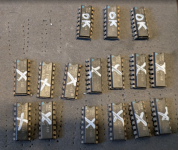
Probing the DRAM suggests that a few of them have stuck outputs... I suspect up to 7 of the 16 to be fails...

So I removed them ALL !!
1746172754412.png

And I splashed out on a DRAM tester... https://www.ebay.co.uk/itm/115545495551 which I assume works! Nice design anyway (STM32G0 based)...

1746172979249.png

13 dead; 3 OK !

So the question is... do I put my life savings into 4116s or think of an alternative?
 

NivagSwerdna

Active member
Feedback
1 (100%)
Credits
744CR
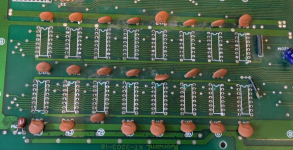
OK... so I do like to get side tracked... anyway 13 out of 16 4116s were defective so I removed the lot...

I could have replaced with 4116s... but that would have been quite expensive and a bit boring... or even 4164s...

But instead I decided to make a replacement board to replace with modern(-ish) static...

1748804553379.png

Will it work? No idea. But if it does I don't need -5V (for the DRAM at least) and probably less +5V and +12V.

I'll try it out when I have time!
 

Phils Arcade

Senior Member
vacBacker
Feedback
10 (100%)
Credits
1,387CR
OK... so I do like to get side tracked... anyway 13 out of 16 4116s were defective so I removed the lot...

I could have replaced with 4116s... but that would have been quite expensive and a bit boring... or even 4164s...

But instead I decided to make a replacement board to replace with modern(-ish) static...

View attachment 39924

Will it work? No idea. But if it does I don't need -5V (for the DRAM at least) and probably less +5V and +12V.

I'll try it out when I have time!

Oh the suspenders is killing me

... sorry suspense :)
 

NivagSwerdna

Active member
Feedback
1 (100%)
Credits
744CR
OK... so back from a medical excursion and then a holiday... life is starting to get in the way...

So I fired it up and it didn't look much better... decided that I no longer trusted the 6809 and since I had got another one from EBAY decided to try it and see if there was any difference...


Screenshot 2025-06-24 20-52-20.png

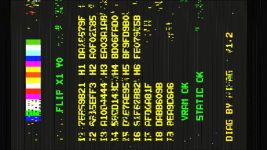
So this is interesting! The Diagnostic now runs... must be a flaky 6809E... I will put it aside for now but suspect it must have issues...

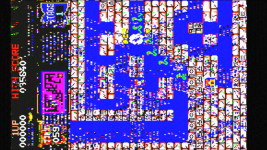
The diagnostic sort of runs but with screen corruption... even though it says VRAM OK... (cannot remember how extensive that test is)...
Some things look good... the colour palette looks pretty... there are some checksums... (I cannot remember if they are correct or not)...
Scrolling does work... so the 085 is probably good... and generally it renders so most things must be good...

Now are the dodgy pixels my DRAM replacement or a problem that was already there! (Never change more than one thing at a time!)

PS
I think H3 and H6 checksums are not what I expect... 2D62D7B1 and C43B3865... ? will have to check which is correct... this or that.
 
Last edited:
Top