Tempest. Math Box error.

smarty

Ready Player One
vacBacker
Feedback
12 (100%)
Credits
1,291CR
Tempest. Mathbox errors.

Hello everyone, following on from fixing the W&G6100 monitor, the gameboard has thrown a wobbly and I'm getting 'M' error in test mode (general Math Box error) In attract mode the display acts normally when showing the high score table and Tempest logo, but when it gets to showing the tunnels, vectors on screen go crazy and the tunnels don't really show and scaling of the vectors is all wrong. Whilst this is happening the P1 & P2 leds on the CP go solid, as attract mode moves on to score or logo the LED's start flashing as normal.

The game was working for a short while before this and I tested some parts with another board, I'm 99% sure the current fault is NOT to do with the following items:

*Bit Slice IC's. All four swapped out with known good IC's.

*Pokeys. Again been swapped with known workers.

*Aux/AVG link cable. Tested fine with two different cables before the fault.

*Header pins for above cable, have all been re-soldered no signs of bad/dry/cracked solder joints.

*Voltages all to spec.

My programmer (Dataman S3) won't read the proms on this board so I could be chasing my tail here because one of these could be bad, I'll have to try and prove one way or the other during the course of hopefully fixing, whether they are good or bad.

Video below of the fault, I should have filmed it with the lights off but you can make out what I've described above.


The above has taken place for over the last week during some free time. Moving on to tonight...

I've now got the monitor unplugged and am viewing the X-Y output on my scope, the boards are nicely balanced out of the cab on a big box and are separated for easier handling. I have the AUX board schematic printed out over 9 A4 sheets so I should be able to follow signal a bit easier than reading from a PDF file.

I'm a N00b when it comes to fixing boards so any help and tips will be appreciated :)

I've had a quick dabble around tonight with my logic probe, and have noticed that address line A1 is low with no activity on it. IS this normal (probably not?)

I removed B1 (LS374) as it was in a socket already probing the socket all the Address lines Pulse every second or so with exception of A1 (pin 13) which is low. Direct connections to this line are the four bit slice IC's and the Proms from what I can make out.

That finishes up where I've got tonight (only had an hour or so), I'll be spending some later this week and will update If I have anything useful to say!

Cheers, Mart.
 

Equites

Chief Sheesher®
vacBacker
Feedback
35 (100%)
Credits
3,318CR
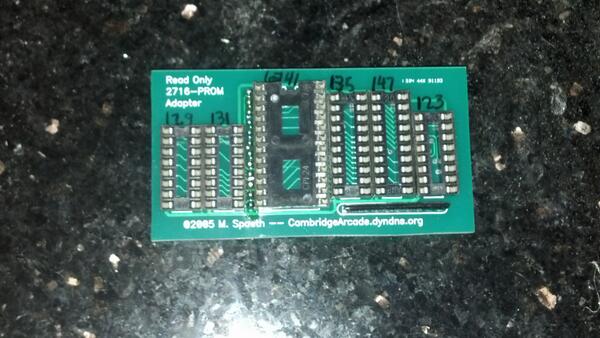
I would definitely be checking those PROMs. You can read them as 2716s if you have the patience to build an adaptor;

PROM_adaptor.jpg


Also, do not overlook bad sockets, especially the PROM sockets.
Equites2014-03-10 21:54:27
 

RGP

Meeter & Greeter
Feedback
5 (100%)
Credits
2,039CR
Definitely try and get those PROM's verified first.

I have a similar problem with a Battlezone set - I get error "L" and no in-game vectors get drawn. All my PROM's have been verified and my bit slices are good too so i'm down to sockets and auxiliary TTL's.
 

smarty

Ready Player One
vacBacker
Feedback
12 (100%)
Credits
1,291CR
I tried making an adapter up tonight. My reader didn't seem to pull any checksum from the 287's. From the 74s287 I have GND,VCC, A0-A7 & Q0-Q3 connected, they're mapped to the 2716 pins, what do I need to do with the remaining address lines and data lines that aren't used? Tie them to ground? they're currently not connected to anything?

Not as pretty as yours Nad!

I will get this working!
smiley1.gif


Adapter.png
 

smarty

Ready Player One
vacBacker
Feedback
12 (100%)
Credits
1,291CR
haha, pretty is not necessary in this case, I just need to read these proms.

I need to get some header pins as I think that will make a better connection that the eprom socket I'm currently using.
 

Equites

Chief Sheesher®
vacBacker
Feedback
35 (100%)
Credits
3,318CR
Mart,

That pic of an adaptor is not one of mine, but made by Mark Speath, nice and handy. I'm fortunate enough to have a Data IO 29b which can read/write any PROM pretty much.

Tempest has six 74S287 (82S129) and one 74S288 (82S123) on the Aux Board.

It sounds like you have wired up the adaptor correctly, the 8 data lines are connected respectively, and the 5 address lines that the 82S123 has are connected to A0-A4 of the 2716. The rest of the address lines are left unconnected (like you have done). Don't forget about VCC and VSS (GND). Most programmers may complain about unconnected address lines, however you should just be able to 'ignore' and read as-is.

Don't forget, this will allow you to Read the PROM only, the programmer will not have the correct voltages required to burn the internal fuses of a PROM to program it.

I think you have Read the PROM successfully.

Don't forget, when you read a 82s123 as a 2716, you will end up with the same data repeated over and over 64 times if my maths is correct. So, you will have to truncate anything but the first 32 bytes (for a CRC check) or simply compare the data visually with a known good data image using a HEX editor like UltraEdit.

https://www.ukvac.com/forum/data/uploads/739/tempest_mathbox_prom.zip

Equites2014-03-13 22:33:03
 

Mitchell Gant

Active member
vacBacker
Feedback
2 (100%)
Credits
884CR
Nice work!

You should tie the 4 unused "2716 plug" data pins D4-D7 to GND to prevent them floating and reading junk.

Also you didn't mention the Chip Select pins being connected?

You should tie PROM CS pins 13 and 14 together and then on to the 2716 CS pin 20 so that the programmer can enable the PROM for reading.

If you do find a faulty PROM then I don't think you'll have any possible option to fix it... I can come and take the entire scrap machine out of your way, I won't even charge you for it! How kind is that offer, eh??
smiley1.gif
 

smarty

Ready Player One
vacBacker
Feedback
12 (100%)
Credits
1,291CR
Equites said:
Don't forget, when you read a 82s123 as a 2716, you will end up with the same data repeated over and over 64 times if my maths is correct. So, you will have to truncate anything but the first 32 bytes (for a CRC check) or simply compare the data visually with a known good data image using a HEX editor like UltraEdit.

uploads/739/tempest_mathbox_prom.zip

Thanks for those prom files, that gives me something to compare against. I take it these files are the same as what you'd get in Tempest rom set for MAME? That's what I would have used to compare against.

Mitchell Gant said:
You should tie the 4 unused "2716 plug" data pins D4-D7 to GND to prevent them floating and reading junk.

Also you didn't mention the Chip Select pins being connected?

You should tie PROM CS pins 13 and 14 together and then on to the 2716 CS pin 20 so that the programmer can enable the PROM for reading.

If you do find a faulty PROM then I don't think you'll have any possible option to fix it... I can come and take the entire scrap machine out of your way, I won't even charge you for it! How kind is that offer, eh??

Yes you are correct, I haven't tied the CS pins to together, now I know what they do
smiley9.gif
, I'll add those links tonight and ground the remaining data lines on the 2716.

Thanks you again for your help, oh and Neil I can't accept your offer, its is just too generous I couldn't let you do that much for me.
smiley36.gif
 

smarty

Ready Player One
vacBacker
Feedback
12 (100%)
Credits
1,291CR
OK so I've now made both adapters and have found all proms match the checksums I have generated from the attached files above in HxD hex editor, the checksums are as follows:

.126 = 08CD

.127 = 04B4

.128 = 04C2

.129 = 01D5

.130 = 0377

.131 = 086E

.132 = 05E7

I have been over the header pins with an iron and its made no difference. The prom sockers are turned pin and all the solder looks good and relatively new, probably swapped by Mark from Retroclinic before I bought the board ~18 months ago.

I think I definitely have a faulty component on this board, I'll be spending some time tomorrow probing about to see If I can find anything that doesn't look right.
 

tb lilley

5 Star
vacBacker
Feedback
2 (100%)
Credits
1,686CR
If you've got a spare board set it's probably worth swapping over the interconnect cable that joins the Main Board and the Aux Board. It's an outside shot, but for the sake of the few minutes it'd take, worth it to be sure.
 

smarty

Ready Player One
vacBacker
Feedback
12 (100%)
Credits
1,291CR
When this board was working I tried another interconnect cable I have and the game continued to work, I have since re-tried this cable and it makes no difference to the fault.
 

Mitchell Gant

Active member
vacBacker
Feedback
2 (100%)
Credits
884CR
smarty said:
Tempest. Mathbox errors.

I've had a quick dabble around tonight with my logic probe, and have noticed that address line A1 is low with no activity on it. IS this normal (probably not?)

I removed B1 (LS374) as it was in a socket already probing the socket all the Address lines Pulse every second or so with exception of A1 (pin 13) which is low. Direct connections to this line are the four bit slice IC's and the Proms from what I can make out.

So it's not PROM failure or bit slice or bad solder on connector pins. So that's the common stuff eliminated, shame!

I have no idea if signal A1 from the O3 pin of PROM at L1 should be low all the time, but you could look through the chip L1 PROM hex data in your hex editor and see if bit 1 is set anywhere. I reckon it probably should be somewhere but without looking I wouldn't know.

If it is set then you may have a physical short to ground on that A1 PCB track. Test it with a meter on continuity with game off.

If it's not shorted I'd look at those '161 counters at D1 and C1, starting with D1. Probe the QB output at pin 13 to start with, though it doesn't really mean much as the actual A1 signal is PROM data generated and not necessarily related to that QB counter signal. But gut feeling tels me it might be, so worth a start there.

Even if that QB pin 13 isn't toggling, it doesn't mean that counter is faulty... it could be that the design never loads a '1' into that counter signal B...or the count could never clocks more than 2 pulses. Very unlikely though I reckon.

So then I'd change the counters as a shotgun replace and hope.
smiley29.gif


If that didn't work I'd leave it alone and sulk for a few days.
 

smarty

Ready Player One
vacBacker
Feedback
12 (100%)
Credits
1,291CR
Mitchell Gant said:
If that didn't work I'd leave it alone and sulk for a few days.

Fast forward six months... lol
smiley2.gif


Well I didn't sulk for six months, but I did sideline this and move on to other cab bits and bobs, anyway back on topic...

So upon re-testing the boards, the X axis output had stopped working, this was caused by a failed TL082 at location D/E12 on the main AVG board, pin 7 wasn't outputting anything, I fitted a new socket and replacement IC and had a stable output again, back to where I was six months ago.

Last week I got stuck into this fault again, (Crazy vectors and Showing Mathbox error in test mode) I have spent a good few hours probing with a scope and logic probe to try and track down where the issue was, I got the schematics printed onto A1 paper at work, I even de-soldered all the proms from another Tempest AUX board to double check my proms had verified correctly, which they had.

Now, convinced that it wasn't a Prom/Bitslice/Socket or Interlink cable, I honed in on the remaining IC's in the Mathbox area. E4 a 7408 (quad 2-Input AND gate) got my attention, now I'm not really proficient enough in fixing boards to understand what was wrong but pin 6 which drives the clock input of B1 (374) didn't look pulse correctly on my logic probe, the frequency of the pulsing was all over the place and the HI/LOW LED's were going 'mental' in an odd way. I tried piggybacking a known good chip onto the 7408 to no avail, not deterred I de-soldered it and put a socket on the board. I then tested the IC in my Programmer which also tests 74 series logic, and sure enough one of the gates reported faulty. I put a new 7408 in and BOOM! The game is working again!

I have ordered new TL082's, MC1495's, trim pots for X/Y size/position adjustments and will fit these when the arrive to hopefully improve the reliability of this board, but for now I think I'm due a few credits. :)


Mark H

Active member
Feedback
7 (100%)
Credits
98CR
Hi All,

I was playing my Tempest this weekend and I too got a similar graphics glitch to Smarty. The tube lines were all corrupted (some of them even turned red) but the sound still worked. I then did a "self test" and I got an "M" error code which first flickered then stayed static on the top half of the screen ah it must be a "math box" error. I turned the game off and left it for a few minutes and switched it back on but I still had the issue (yes I did not really think that would work!). I then removed the PCB and checked all the main connectors and main chips and pressed them down gently which looked fine. I then put the PCB back in and switched the game on and all was ok and the dreaded "M" error code had gone ! Ah old tech eh !!??

Cheers

Mark
 

t-m

Active member
vacBacker
Feedback
2 (100%)
Credits
333CR
Nice work!

I fixed the Tempest that went down at the Cambridge Museum event a week or so ago, similar fault, it just needed the chips reseating.
 
Top