

You are using an out of date browser. It may not display this or other websites correctly.
You should upgrade or use an alternative browser.
You should upgrade or use an alternative browser.
Help with 486
- Thread starter Retroman839
- Start date
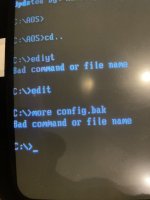

No, wait, it's the old 8-character limit on the file name. I don't think you're correct. CONFIG.BACKUP → short name: CONFIG.B~KEvery time the text editor saves a file it writes a .bak file for the file being edited so it's the last edit which might have overwritten a change you want to keep.
It is much safer to manage the backups yourself by copying the good file to a numbered backup.
Check the contents of the file using the command "more config.bak" to see what's in it.
Surely?
Retroman839, do a VER and let us know what version we're dealing with here.
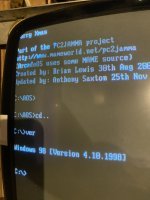
This is the thingTypo on line 2 in config.sys:
DEVICE=C:\SB16\DRV\\CTSB16.SYS /UNIT=0/BLASTER=A:220 I:5 D:1 H:3
Should be:
DEVICE=C:\SB16\DRV\CTSB16.SYS /UNIT=0/BLASTER=A:220 I:5 D:1 H:3
I can't remember if it all has to be on one line if it is allowed to be on multiple lines.
I don’t remeber it being this ?
Also this top line
Files =40
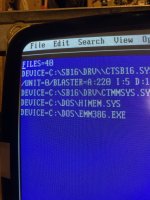
I don’t remeber that either ?
On side note
My 486 thinks it’s Christmas
And arcadeos is snowing
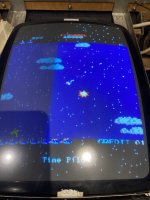
My 486 thinks it’s Christmas
And arcadeos is snowing
It all started when I plugged a keyboard into my spare ps/2 port .
I received a message that soundblaster enviromemt was no longer set
I received a message that soundblaster enviromemt was no longer set
FILES=40 is the maximum number of file handles that can be open in DOS.
This may have been added by the Windows 98 loader. I can't remember. It has been over 25 years.
The device command might have been written by the SoundBlaster diagnostic program.
I would definitely put the device command all on one line:
DEVICE=C:\SB16\DRV\CTSB16.SYS /UNIT=0/BLASTER=A:220 I:5 D:1 H:3
Reboot and then test.
A handy command to order the files by directory first in autoexec.bat is:
SET DIRCMD=/OGN
Which can still be used to this day for the Windows 10 command prompt!
This may have been added by the Windows 98 loader. I can't remember. It has been over 25 years.
The device command might have been written by the SoundBlaster diagnostic program.
I would definitely put the device command all on one line:
DEVICE=C:\SB16\DRV\CTSB16.SYS /UNIT=0/BLASTER=A:220 I:5 D:1 H:3
Reboot and then test.
A handy command to order the files by directory first in autoexec.bat is:
SET DIRCMD=/OGN
Which can still be used to this day for the Windows 10 command prompt!
It all started when I plugged a keyboard into my spare ps/2 port
I already put it all on one line as you mentioned.FILES=40 is the maximum number of file handles that can be open in DOS.
This may have been added by the Windows 98 loader. I can't remember. It has been over 25 years.
The device command might have been written by the SoundBlaster diagnostic program.
I would definitely put the device command all on one line:
DEVICE=C:\SB16\DRV\CTSB16.SYS /UNIT=0/BLASTER=A:220 I:5 D:1 H:3
Reboot and then test.
A handy command to order the files by directory first in autoexec.bat is:
SET DIRCMD=/OGN
Which can still be used to this day for the Windows 10 command prompt!
No sound though yet
Were you using a 5 pin DIN keyboard previously and now using a PS/2 keyboard?
If so I would power off the machine and disconnect the PS/2 keyboard and go back to what you were using previously.
I don't think a PS/2 keyboard would cause a DMA or IRQ conflict with the soundcard.
If so I would power off the machine and disconnect the PS/2 keyboard and go back to what you were using previously.
I don't think a PS/2 keyboard would cause a DMA or IRQ conflict with the soundcard.
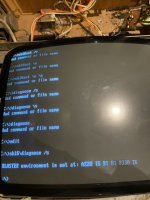
Yes I think this is what’s occurred …Were you using a 5 pin DIN keyboard previously and now using a PS/2 keyboard?
If so I would power off the machine and disconnect the PS/2 keyboard and go back to what you were using previously.
I don't think a PS/2 keyboard would cause a DMA or IRQ conflict with the soundcard.
Can I show you my bios settings ?maybe you see what’s occurring ?
My irQ for SB is 5
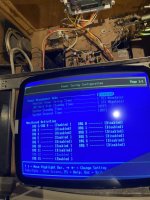
I don’t think this irQ for mouse was ever enabled ?

I don’t use mouse but would be good for mame . But I’m sure it was never set to enabled before .
I don’t use mouse but would be good for mame . But I’m sure it was never set to enabled before .
it has also made my
Anything to do with this DMA?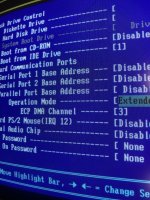
A PS/2 keyboard would typically use IRQ 1. I can't remember IRQ 12 being used for a mouse. Serial mice used to be read by polling.
Maybe set DRQ 1: Enabled
In the BIOS because the soundcard is configured to use DMA 1.
Anything to do with this DMA?
Last edited:
It must be something in the bios because I have the
Hard drive image backed up
And this is a restore hdd I’m using Só maybe all the files are fine and it’s just one irQ setting is off ?
Hard drive image backed up
And this is a restore hdd I’m using Só maybe all the files are fine and it’s just one irQ setting is off ?