Any interest in a Group buy in wigan 3x noir?

Retroman839

Senior Member
vacBacker
Feedback
13 (100%)
Credits
7,999CR
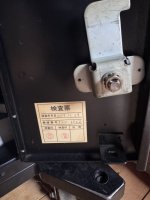
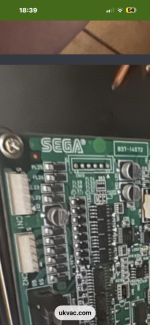
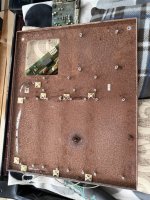
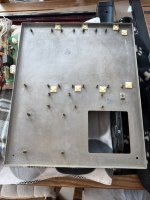
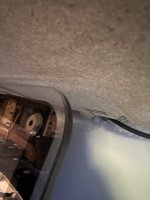
Took the back off my Noir, here’s a couple of bad pics. 😳😳

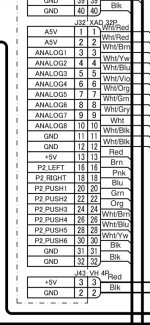
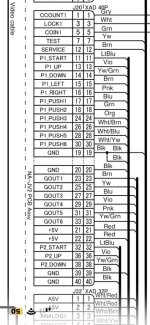
I can see the resistor, wrapped in tape but it’s hard to see which connections it connects too. View attachment 65812View attachment 65811
Thanks man ..
Yeh sega loom i know the cable on that one ..
It’s like pin 3 …
I have them looms with the resistor in.
I’m looking for the cable on the namco loom

I’m on the Namco loom
 

Retroman839

Senior Member
vacBacker
Feedback
13 (100%)
Credits
7,999CR
Thing is though is that I have a coin mech working in this noir ..

But I think that is it a link up cab issue

Like all these jvs fighting games that through errors are 2 player 3d games
Are they expecting a multi coin mech
Multi coin counter set up ?
As coin meter 1 & coin meter 2 are avalible on the io 🤔
Like back to back or side by side link up was expected?
 

Retroman839

Senior Member
vacBacker
Feedback
13 (100%)
Credits
7,999CR
The Type X2 BIOS looks for a physical connection loop back through the I/O board to confirm a coin counter is attached. Without it, the game freezes with a JVS or Coin communication error. [1, 2, 3]

The Hardware Spoof (100-Ohm Resistor Trick)
To bypass this check, you must bridge the coin meter pins: [1, 2]
  1. Locate the coin door wiring harness or the JVS I/O board pins inside your Namco Noir cabinet.
  2. Add a 100-ohm resistor inline between the Coin Meter/Counter Ground pin and the +5V power pin on your cabinet’s I/O lines.
  3. For cabinets with two coin slots mapped by default, you may need to loop both coin counter lines individually to the +5V line, using a separate 100-ohm resistor for each. [1, 2, 3]
Once this hardware loop is present, the JVS system registers a "functional" coin mech and allows Niko's multi to finish booting without a lockout. [1, 2]
 

Chihiro

I do this shit for a living yo!
vacBacker
Feedback
6 (100%)
Credits
977CR
Remember guys, white spirit vinegar is MAGIC 🪄✨✨

View attachment 65941

View attachment 65942

Just be sure to lacquer or paint straight after taking it out 👍
Older machine with the 3.3v PSU and flo top light same as mine the STD connect pcb shown in your pic can clean up nice with a bit of fairy & ipa then use a air blower to dry.
 

Retroman839

Senior Member
vacBacker
Feedback
13 (100%)
Credits
7,999CR
Older machine with the 3.3v PSU and flo top light same as mine the STD connect pcb shown in your pic can clean up nice with a bit of fairy & ipa then use an air blower to dry.
Ai seems
To think I can spoof my standerd namco noir io .. on the coin mech
To pass the jvs error ?

But I already have a coin mech and it’s working !
So I don’t think the spoof can be a thing .. unless it needs 2 coin mechs to make the game think I have 2 cabs back to back ?
Tekken style .. which it seems this
Io was for noirs back to back with
Tekken 6 blood lines

Anyone know if that’s a thing ?
Street fighter 4 needing to be in 2 cabinets mode to pass the jvs test ?
Also Deathsmiles 2
And chaos breaker .
Battle fantazia
All fail jvs .

Nesica work ok
Sf3
Sf hyper aniversary
Etc..
 

Crazy_1201

User
Feedback
2 (100%)
Credits
97CR
Ai seems
To think I can spoof my standerd namco noir io .. on the coin mech
To pass the jvs error ?

But I already have a coin mech and it’s working !
So I don’t think the spoof can be a thing .. unless it needs 2 coin mechs to make the game think I have 2 cabs back to back ?
Tekken style .. which it seems this
Io was for noirs back to back with
Tekken 6 blood lines

Anyone know if that’s a thing ?
Street fighter 4 needing to be in 2 cabinets mode to pass the jvs test ?
Also Deathsmiles 2
And chaos breaker .
Battle fantazia
All fail jvs .

Nesica work ok
Sf3
Sf hyper aniversary
Etc..
Sf4 ttx2 multi was working fine with my cab on the 1p
 

Crazy_1201

User
Feedback
2 (100%)
Credits
97CR
Thanks
I think mine is v2 also
Must be a settings issue then
Yeah sounds like it. If you can somehow get into the settings menu.

I found this: so maybe if possible hook up the drive to another pc with windows and don’t boot from it?

What is this "config.ini" file?:
In short a "config.ini" file is used to define some options for a game. For example, some games only support JVS I/O boards and if you happen to be using the multi with a FastIO board, you can add a line into a "config.ini" file that sets "gametype=jvs".
Doing this tells the multi what kind of I/O board the game expects so it can startup the FastIO to JVS emulator with the game. There are other options which can be set via the config.ini, but none of importance at the moment.
 

Retroman839

Senior Member
vacBacker
Feedback
13 (100%)
Credits
7,999CR
Yeh AI says

Niko added a duel line in the config.ini

that can auto choose between
Taito fast io
And jvs .

Also
config.ini needs the
Polling speed to be
Polling=10 in the Ini as well
For the correct polling speed for the handshake between io jvs pcb & the game hardware
 
Top