Dos mame , sound blaster issue

Retroman839

Senior Member
vacBacker
Feedback
12 (100%)
Credits
7,195CR
Is it possible
That because this is legacy
That set blaster=A240 , I10 , D0

The D0 is zero because I have no settings in bios to change this that D0 is a default ?
 

Hexen

Active member
Feedback
2 (100%)
Credits
487CR
I May have to do that
I can get anothe 486 but I don’t want to throw towel in !

Gotta be a way to get this going
Shall I down load the drivers
And try running them
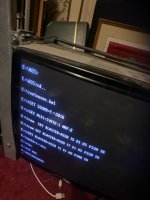
If you can find the specific DOS drivers or setup disk for the actual card, or the main chip ID number, it could work. I'll get to my DOS MAME machine in a bit and take pictures of my A.bat and C.sys files that could help. I'm using an SB compatible card, but you never know.
 

Retroman839

Senior Member
vacBacker
Feedback
12 (100%)
Credits
7,195CR
I started changing some values
Of the original line that was used ..
First I changed the D0 to D1
That didn't work
Then I changed the irQ 10 to irQ 5 that did it ..
My p value is p300 not p330
 

Retroman839

Senior Member
vacBacker
Feedback
12 (100%)
Credits
7,195CR
Massive thanks to all for sharing this ancient of knowlage….

I’m much more equipped now for my adventure into dos gaming …

can’t wait to try to get a joystick to work in xwing tie fighter
 

Hexen

Active member
Feedback
2 (100%)
Credits
487CR
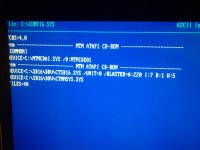
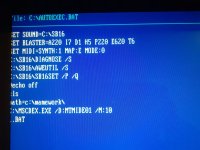
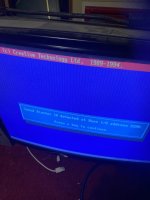
A few pixels from the left are missing, anything with a 'REM' before it can be left out, some stuff in there is to drive a CDR, so forget everything after @ECHO OFF.

C:\CONFIG.SYS should have lines 7 and 8 added to yours after any CDR drivers.

You know your address is 220, just play with I, usually 5 or 7, and D.
 

Attachments

  • 20251123_195541.jpg
    20251123_195541.jpg
    76.5 KB · Views: 8
  • 20251123_195618.jpg
    20251123_195618.jpg
    120.5 KB · Views: 8

Retroman839

Senior Member
vacBacker
Feedback
12 (100%)
Credits
7,195CR
A few pixels from the left are missing, anything with a 'REM' before it can be left out, some stuff in there is to drive a CDR, so forget everything after @ECHO OFF.

C:\CONFIG.SYS should have lines 7 and 8 added to yours after any CDR drivers.

You know your address is 220, just play with I, usually 5 or 7, and D.
Do you know what your mode0 is on the midi synth ?

Also I guess I need to add all the
Diagnose and mixer to the autoexec.bat for it to work ?

That explains why it was not working for me too as it’s not in my a.bat
 

Retroman839

Senior Member
vacBacker
Feedback
12 (100%)
Credits
7,195CR
Ah, you have it working?
Yes I know it wouls be something tiny …

It was a shame sound went out on me then I backed up the image .. I was amazed when it first worked cab was in a out garage old quantum ide mage some funny noises and didnt load for a few power cycles but third time it did and has been fine ever since but I just used a ssd ..

I want to boot without logo next as that’s the other thing that was lost ..
It now has a acer screen logo that needs to go!
Thats in attributes?
 
Last edited:

Hexen

Active member
Feedback
2 (100%)
Credits
487CR
Yes I know it wouls be something tiny …

It was a shame sound went out on me then I backed up the image .. I was amazed when it first worked cab was in a out garage old quantum ide mage some funny noises and didnt load for a few power cycles but third time it did and has been fine ever since but I just used a ssd ..

I want to boot without logo next as that’s the other thing that was lost ..
It now has a acer screen logo that needs to go!
Thats in attributes?
The acer logo will be in the motherboard firmware and nothing to do with autoexec.

There should be a 'quiet boot' option in BIOS which will blank the logo screen.
 

Retroman839

Senior Member
vacBacker
Feedback
12 (100%)
Credits
7,195CR
The acer logo will either be in the motherboard firmware and nothing to do with autoexec.

If there's a 'quiet boot' option in BIOS then that might solve it. If not, then it would need some BIOS reflash where at least you could use your own picture, but at the risk of bricking the board.
I have dips on the mother board
Maybe one is logo
 

Hexen

Active member
Feedback
2 (100%)
Credits
487CR
I have dips on the mother board
Maybe one is logo
The DIPs are most likely for processor and memory speed. If you haven't moved them, then they won't be for the logo.

The setting is definitely in the BIOS. Maybe even 'Fast Boot'?

If you can show or list every page in the BIOS...
 

Retroman839

Senior Member
vacBacker
Feedback
12 (100%)
Credits
7,195CR
The DIPs are most likely for processor and memory speed. If you haven't moved them, then they won't be for the logo.

The setting is definitely in the BIOS. Maybe even 'Fast Boot'?

If you can show or list every page in the BIOS...
I looked already .. don’t think quite or fast / but I will have another look
..👍
 
Top