
The hotkeys all work fine. It’s in-game where the issue is. Start only registers when you let go of the button. Holding it down does nothing as it seems to be set up for the 3-second exit hotkey instead. Even if you turn that off, it doesn’t fix it. Try it in any test menu and you’ll see what I mean. I only realised it when I was trying to enter the cheats in Zero 3.I think all the hotkeys that are pre-defined can be changed via config files.. Once you get it on wifi you can ssh in and do the linux!
varous hotkey enables etc, you can also use ESC on a usb kbd. I have a little microsoft one with a USB/not-bluetooth-but-similar wireless protocol

You are using an out of date browser. It may not display this or other websites correctly.
You should upgrade or use an alternative browser.
You should upgrade or use an alternative browser.
Recalbox RGB Jamma
- Thread starter funk
- Start date

hmm I've messed with this in the menus for some of the SFA3 inputs. Can't recall it offhand, but you can edit it non-persistently then save. The menus are a bit labyrinthine, but I'm sure you can get that "hold P1 to exit" disabled/require test switch instead
hmm I've messed with this in the menus for some of the SFA3 inputs. Can't recall it offhand, but you can edit it non-persistently then save. The menus are a bit labyrinthine, but I'm sure you can get that "hold P1 to exit" disabled/require test switch instead
I have disabled it, to no avail. It’s got to be something to do with Start being the Hotkey Emable button in RetroArch.
This is where MiSTer shines. Start and Right brings up the menu even if you set it to something else (mine is Start and Coin Reject), but it doesn’t affect in-game controls.
is your goal to disable P1 start as the hotkey modifier? I have a keyboard plugged in to USB on mine that I've used for some unusual input combos. I guess always some compromise when it tries to run everything at once with consistencyThere is apparently no current fix for the Start button issue either. It is being looked into, but an alternative can’t be worked out so it may never happen.
is your goal to disable P1 start as the hotkey modifier? I have a keyboard plugged in to USB on mine that I've used for some unusual input combos. I guess always some compromise when it tries to run everything at once with consistency
Not necessarily disabling it as the Hotkey enable, it’s more enabling it as a proper Start button. I could wire up something to a USB port to get around it, but it’s still a pain. I’m not the only person experiencing issues with it. Loads of people on the Discord also want something implemented.

Sp33dFr34k
Newbie
Would be good when v10 gets out as it will be getting 24khz and Guncon2 support. It's what I'm eagerly waiting for 
Would be good when v10 gets out as it will be getting 24khz and Guncon2 support. It's what I'm eagerly waiting for
There is no AV port on the unit. It cannot support GunCon without a hardware revision.
Sp33dFr34k
Newbie
There are plenty of ways around that, just have to be creative, it only needs the sync wire and groundThere is no AV port on the unit. It cannot support GunCon without a hardware revision.
But let's see what they come up with.Hmm doesn't 24khz go via jamma connector? I was sort of tempted to get a tri-sync originaly (to be able to use the 640x480/vga mode for some newer stuff), though the general wisdom was that if I mostly wanted 15khz (true) those look much better on the ms9-29s that are more native 15khz.
I was kind of wondering if the 24khz mode that the chassis/screen can do might look better for the tate mode stuff, though it's only a few of those that look slightly weird to me
I was kind of wondering if the 24khz mode that the chassis/screen can do might look better for the tate mode stuff, though it's only a few of those that look slightly weird to me
Sp33dFr34k
Newbie
Sure does, I have a MS9 as well, it can autoswitch between 15khz and 24khz. Looking forward to itHmm doesn't 24khz go via jamma connector? I was sort of tempted to get a tri-sync originaly (to be able to use the 640x480/vga mode for some newer stuff), though the general wisdom was that if I mostly wanted 15khz (true) those look much better on the ms9-29s that are more native 15khz.
I was kind of wondering if the 24khz mode that the chassis/screen can do might look better for the tate mode stuff, though it's only a few of those that look slightly weird to me
Hey all-- I could use a little help.
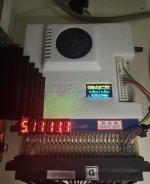
Adjusted my PSU to 5.08V, had it on 5.10V, 5.25V, 5.00V bang on... and it still shows two lights.
I am measuring from the top of the jamma edge with the Recallbox plugged in :/
Two green lights as shown. My mistercade works fine... any advice? I am hoping it's not any more tiny voltage adjustments.
Thank you!!!
Adjusted my PSU to 5.08V, had it on 5.10V, 5.25V, 5.00V bang on... and it still shows two lights.
I am measuring from the top of the jamma edge with the Recallbox plugged in :/
Two green lights as shown. My mistercade works fine... any advice? I am hoping it's not any more tiny voltage adjustments.
Thank you!!!
Attachments

under that little window of plastic is a switch to disable the 5v protection.
My own experience was that the PSU sends a bit more than 5v at boot up, but once load picked up it was fine measured at the jamma edge. On my new Astro I disabled the protection circuit after talking to the HW devs about it..
But then a couple weeks later I swapped out the SD card for an NVME install, which drew even more power.. so I now just power the pi from a wall plug so I didn’T have to worry about my PSU sending too much to the monitor etc.
I power on the pi, wait a couple seconds, then turn on the cabinet and all is great
My own experience was that the PSU sends a bit more than 5v at boot up, but once load picked up it was fine measured at the jamma edge. On my new Astro I disabled the protection circuit after talking to the HW devs about it..
But then a couple weeks later I swapped out the SD card for an NVME install, which drew even more power.. so I now just power the pi from a wall plug so I didn’T have to worry about my PSU sending too much to the monitor etc.
I power on the pi, wait a couple seconds, then turn on the cabinet and all is great
I have the same setup plus an 12V boost convertor for the sound. Works great.under that little window of plastic is a switch to disable the 5v protection.
My own experience was that the PSU sends a bit more than 5v at boot up, but once load picked up it was fine measured at the jamma edge. On my new Astro I disabled the protection circuit after talking to the HW devs about it..
But then a couple weeks later I swapped out the SD card for an NVME install, which drew even more power.. so I now just power the pi from a wall plug so I didn’T have to worry about my PSU sending too much to the monitor etc.
I power on the pi, wait a couple seconds, then turn on the cabinet and all is great
Forgot to add that- I use the 1/8” jack to plug in to a 2:1 satellite/sub set that I wall mounted next to the cabinet.. so I power on pi & speakers first, then the New Astro City!I have the same setup plus an 12V boost convertor for the sound. Works great.
The pi will “commit” to the wall plug voltage after a couple seconds, so that’s why I power it on a few seconds before the cabinet
So you have both power from usb and jamma connector same time after you turn on the cab?Forgot to add that- I use the 1/8” jack to plug in to a 2:1 satellite/sub set that I wall mounted next to the cabinet.. so I power on pi & speakers first, then the New Astro City!
The pi will “commit” to the wall plug voltage after a couple seconds, so that’s why I power it on a few seconds before the cabinet
Yes. 2 reasons..So you have both power from usb and jamma connector same time after you turn on the cab?
1) my new Astro city was fussy with that “overvolt” at start up. I didn’t want to turn up the output for all voltages to compensate
2) the pi with an nvme instead of micro-std requires more power, and was more than the 5v rail wanted to output.
It was working (but fussy with my particular hardware) on just the cab power & 5v rail until I added the nvme
I’d say having done the NVME addition.. it’s MUCH better than a micro SD, even a really nice quality one. Boots up and loads games much faster, doesn’t stress me for reliability.
I’m a bit of a pi wonk- I modify my raspberry pi installs to minimize lots of linux write access to SD cards to improve lifespan